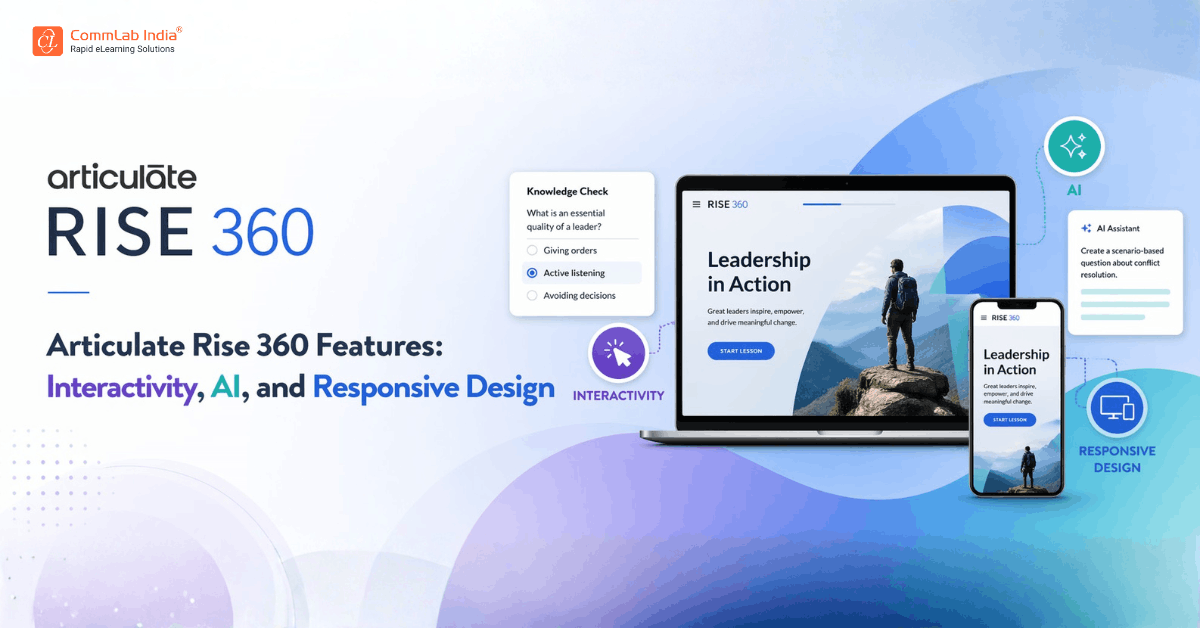
As enterprise learning evolves, the conversation is no longer limited to what content is delivered, but increasingly focused on how efficiently and effectively that content can be created, adapted, and scaled. In this context, the strength of an authoring tool lies not just in its features, but in how those features work together to support modern learning ecosystems.
Articulate Rise 360 stands out precisely because of this integrated approach. Instead of relying on complex development workflows, it offers a structured yet flexible framework that allows instructional designers to focus on learning outcomes rather than technical execution.
Download eBook Now: Rapid eLearning Authoring Tools
Its capabilities, centered around block-based authoring, built-in interactivity, AI-assisted content creation, and responsive design, form a cohesive system that enables organizations to deliver learning experiences that are both scalable and engaging. When used strategically, these features allow L&D teams to move faster, maintain consistency, and adapt content with minimal friction.
Articulate Rise Blocks
At the core of Rise lies its block-based authoring model, which fundamentally changes the way courses are built. Instead of designing content slide by slide, you construct lessons by assembling modular components that can be arranged, modified, and reused with ease.
What Are Rise Blocks?
Blocks are pre-designed content units that allow you to add specific types of elements within a lesson. Each block serves a clear purpose, whether it is to present information, introduce interaction, or guide learners through a structured flow.
This modular approach simplifies course creation while ensuring that the final output remains visually consistent and easy to navigate.
Types of Blocks in Articulate Rise
Rise offers a diverse set of blocks, which can be grouped into four primary categories based on their function.
1. Content Blocks
These blocks form the foundation of any course and are used to communicate core information in a clear and structured manner.
- Text and paragraph blocks for detailed explanations
- Lists and quotes to organize and emphasize key points
- Headings and dividers to create visual hierarchy
They ensure clarity and readability, making it easier for learners to absorb information without cognitive overload.
2. Multimedia Blocks
These blocks enhance the learning experience by incorporating visual and auditory elements.
- Images and labeled graphics to explain concepts visually
- Video and audio embeds to demonstrate processes
- Timeline and process blocks to show sequences
They help translate abstract or complex ideas into more accessible formats, improving comprehension.
3. Interactive Blocks
These blocks introduce engagement within the lesson by allowing learners to actively interact with content.
- Tabs and accordions to reveal information progressively
- Flashcards for recall and reinforcement
- Labeled graphics with clickable hotspots
They break monotony and encourage active participation, which is essential for retention.
4. Assessment Blocks
These blocks are designed to evaluate understanding and reinforce learning.
- Multiple-choice and multiple-response questions
- Fill-in-the-blank exercises
- End-of-lesson quizzes
They provide immediate feedback, helping learners validate their understanding and correct mistakes.
Why the Block-Based Model Is Strategically Important
The true strength of this model becomes evident in large-scale learning environments, where content must be updated frequently and delivered consistently across audiences.
- Modularity enables reuse
Blocks can be duplicated and adapted across courses, reducing redundant effort - Consistency improves experience
Standardized layouts ensure that learners encounter familiar patterns - Speed accelerates delivery
Pre-built structures reduce the time required to develop courses
This approach aligns closely with modern content design systems, making Rise particularly effective for organizations aiming to scale learning operations.
Rapid eLearning Authoring Tools
Explore the What and the Why of Popular Rapid eLearning Development Tools, and GenAI Tools
- Categories of eLearning Authoring Tools
- Considerations to Choose Your Next Authoring Tool
- Features of Popular Rapid Authoring Tools
- GenAI Tools to Create Content, Graphics, Audio, and Video
Interactivity Features in Rise 360
Interactivity is a critical element of effective learning, yet it often introduces complexity in development. Rise addresses this challenge by embedding interactive elements directly into its framework, making them both accessible and easy to implement.
Key Interactive Features
Rise offers a range of interaction types that strike a balance between simplicity and effectiveness.
- Flashcards
Enable quick recall practice through a simple flip mechanism - Tabs and accordions
Organize content into expandable sections, preventing information overload - Labeled graphics
Allow learners to explore visual elements through clickable hotspots - Knowledge checks
Provide instant feedback to reinforce understanding - Scenario-based interactions
Present learners with decisions and guide them through outcomes
How Interactivity Enhances Learning Outcomes
These features are not just functional additions, but are grounded in sound instructional design principles.
- Encourages active engagement
Learners participate in the learning process rather than passively consuming content - Supports chunking of information
Content is presented in manageable segments, improving comprehension - Provides immediate feedback
Reinforces correct responses and addresses misconceptions in real time
While Rise does not support highly complex simulations, it is well-suited for most corporate training scenarios where the objective is to:
- Reinforce key concepts
- Encourage exploration
- Support application of knowledge
This makes it particularly effective for onboarding, compliance training, and product education.
AI Features in Articulate Rise
The integration of AI into Rise represents a significant advancement in how learning content is created and managed. Rather than replacing instructional designers, these capabilities are designed to augment their productivity and creativity.
AI-Assisted Course Creation
AI can generate initial course outlines based on prompts, providing a structured starting point.
- Suggests lesson organization
- Reduces time spent on initial planning
- Helps overcome blank-page challenges
AI-Generated Content
AI supports the creation and refinement of textual content within lessons.
- Drafts explanations and summaries
- Enhances clarity and tone
- Speeds up content development
AI-Driven Assessments
Assessment creation becomes more efficient with AI assistance.
- Generates relevant questions
- Suggests answer options
- Aligns assessments with learning objectives
AI-Powered Media and Localization
AI enhances multimedia and global accessibility.
- Text-to-speech for narration
- Image generation support
- Translation assistance for multilingual audiences
Strategic Value of AI in Rise
The real impact of AI lies in how it shifts the role of instructional designers.
- Reduces repetitive tasks
Allows designers to focus on strategy rather than execution - Accelerates content production
Enables faster turnaround times for training programs - Supports scalability
Makes it easier to produce content at enterprise scale
Responsive Design in Articulate Rise
Responsive design is one of the defining characteristics of Rise, and it is built into the platform by default. This eliminates the need for separate mobile development, which has traditionally been a time-consuming process.
How Responsive Design Works in Rise
Courses automatically adjust to different screen sizes, ensuring that content remains readable and navigable regardless of the device.
- Layout adapts dynamically
- Media resizes proportionally
- Navigation remains intuitive
Benefits of Built-In Responsiveness
- Device flexibility
Learners can switch between devices without losing continuity - Improved accessibility
Content remains usable across various screen sizes - Reduced development effort
No need to create multiple versions of the same course
Responsive Design vs Traditional Approaches
| Aspect | Rise 360 | Traditional Tools |
| Mobile optimization | Automatic | Manual |
| Device compatibility | Built-in | Requires testing |
| Development effort | Low | High |
| User experience | Consistent | Variable |
How These Capabilities Work Together
While each feature delivers value independently, their real strength emerges when they are used together as part of a unified system.
- Blocks provide structure and modularity
- Interactivity enhances engagement and retention
- AI accelerates development and scalability
- Responsive design ensures accessibility across devices
This combination enables L&D teams to:
- Develop courses more quickly
- Maintain consistency across learning experiences
- Scale content production efficiently
When to Use These Features Strategically
To fully leverage Rise, organizations must align its capabilities with their learning objectives.
Use Rise effectively when you need to:
- Develop training quickly without sacrificing quality
- Deliver content across multiple devices seamlessly
- Create engaging yet straightforward learning experiences
- Scale learning programs across teams and geographies
Be mindful when:
- Advanced simulations or deep interactivity are required
- Extensive customization is a priority
- Complex branching scenarios are essential
Conclusion
Articulate Rise 360 distinguishes itself not through isolated features, but through the way its capabilities come together to support modern learning design. Its block-based structure simplifies development, its interactivity enhances engagement, its AI features accelerate content creation, and its responsive design ensures accessibility.
For organizations looking to modernize their L&D strategy, these capabilities provide a strong and practical foundation. More importantly, they enable a shift toward agile, scalable, and learner-centric training, which is essential for building capabilities in a rapidly changing business environment.