
The World is Going Virtual
Remote work isn’t a trend anymore; it’s the workplace. As global teams grow, hybrid schedules settle in, and AI reshapes how people learn, virtual instructor-led training (VILT) has become the go-to model for fast, scalable, and engaging business training. Organizations are no longer asking “Should we go virtual?” They’re asking, “How do we make virtual learning powerful, personal, and performance-driven?”
What is Virtual Instructor Led Training?
Virtual instructor-led training (VILT) is a form of synchronous online training that is delivered in a virtual environment with the instructor and learners participating in the session at the same time, but from different locations.
What VILT is NOT
- VILT ≠ Webinar
- VILT ≠ Online presentation with polls
- VILT ≠ Conducting a classroom session using a conferencing facility
It uses digital tools like annotation tools, chats, breakout rooms, polls, and quizzes to facilitate engaging learning experiences.
Virtual instructor-led training is neither a webinar nor presenting classroom material in a videoconference. Why not?
Though a webinar is also a synchronous training format, it is mostly a one-sided communication from the presenter to the participants. Participants are encouraged to share their opinions, and feedback, or answer questions through polls, but the main essence of virtual classrooms – collaboration – is missing in webinars.
How does VILT differ from eLearning?
VILT (Virtual Instructor-Led Training) and eLearning both deliver digital learning experiences, but they differ in format and interaction style.
- VILT is a live, instructor-led session conducted online through platforms like Zoom or Teams. It allows real-time interaction, discussions, and Q&A, closely mimicking a classroom environment.
- eLearning, on the other hand, is self-paced and asynchronous, where learners access modules anytime, anywhere. It usually includes videos, quizzes, and interactive simulations without a live instructor.
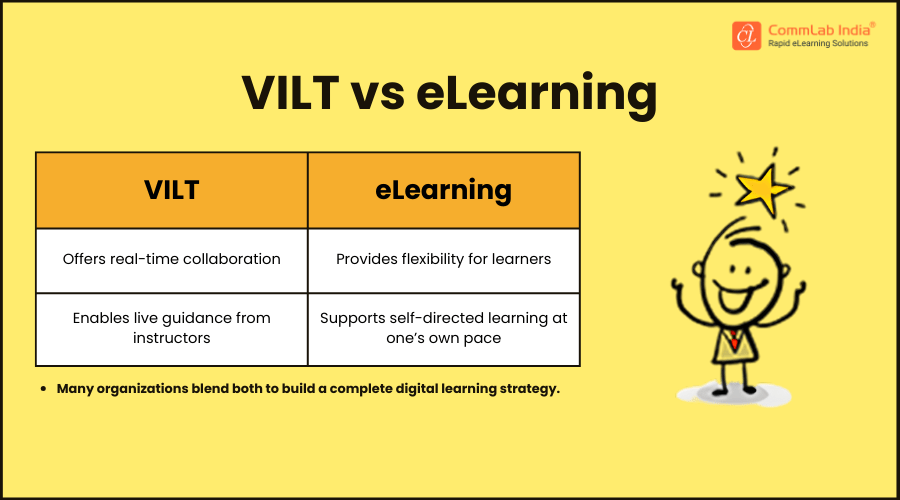
In short, VILT offers real-time collaboration and guidance, while eLearning provides flexibility and self-directed learning—many organizations blend both for a complete digital learning strategy. Highly effective organizations tend to take a blended training approach, combining in-person training (93%) with virtual instructor-led sessions (66%) and self-study elements (50 %).
What are the Benefits of Virtual Instructor-Led Training (VILT)
VILT offers many benefits to organizations as well as learners. The main advantage of VILT is its ability to connect learners of different backgrounds from different locations on one platform.
Let’s explore the other advantages of VILT:
- Convenience and flexibility (learners can engage at work, at home, or on a mobile device, wherever they want)
- Cost-effectiveness
- Ability to upskill employees
- Customizability
It’s a fact that classroom training can be highly engaging. But the good news is it is possible to replicate that experience in VILTs as well. Like the physical classroom, virtual classrooms also give participants the opportunity to:
- Participate and collaborate actively
- Engage in group activities
- Share their learning
Partner with CommLab India for interactive, engaging VILT sessions that overcome the limitations of physical cues and tech hurdles—delivering a seamless learning experience
What are the Two Pillars of the Virtual Classroom
The effectiveness of virtual classrooms hinges on 2 elements –
- Content
- Technology
Content
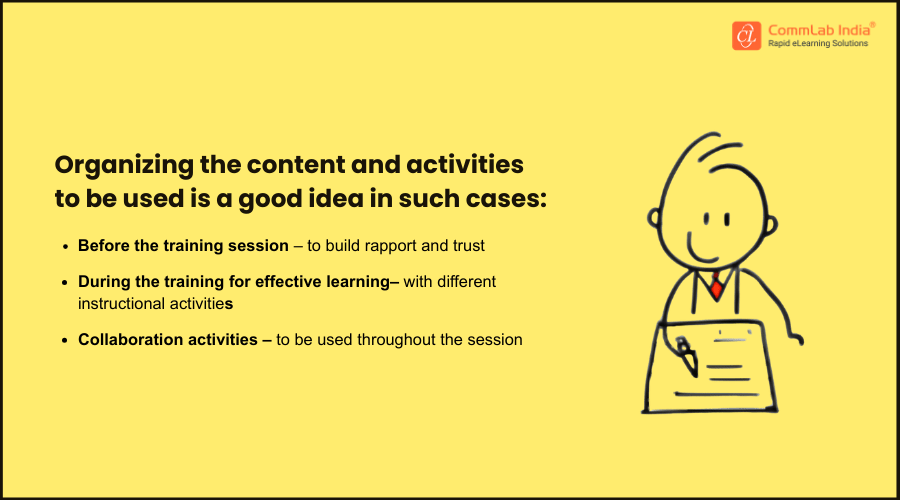
Content is the most important component when it comes to any training and the same is the case with virtual classrooms. Even if you have existing classroom training material (PPTs, facilitator guides, manuals, etc.), you will still have to identify need-to-know content to be included in the virtual session. It’s important that classroom material is not used ‘as is’ as the virtual classroom needs to factor in the absence of the instructor and collaboration.
Technology
Several platforms for VILT are available with unique features that will help you conduct your virtual classroom sessions. Popular ones include:
|
Microsoft Teams |
Cisco Webex |
Adobe Connect |
Vedamo |
|
WizIQ |
Google Classroom |
Zoom |
Miro |
All these platforms offer a variety of tools to enable information sharing and collaboration (replicating the environment of a physical classroom) – each with its own limitations and strengths.
What are the Challenges of VILT and Ways to Mitigate Them?
The virtual classroom has very different challenges when compared to the physical one.
When addressed thoughtfully, these challenges don’t limit VILT, they actually strengthen it. By refining facilitation skills, using the right tools, and designing interactions intentionally, organizations can turn the virtual classroom into a space that’s just as dynamic and impactful as in-person learning. In many cases, VILT becomes even more scalable, accessible, and performance-driven—proving that with the right approach, virtual training can deliver real results at enterprise scale.
What are the Instructional Methods for VILT Sessions?
Establishing goals and ground rules are important for any classroom, a virtual classroom being no exception. In addition to being courteous in their communications, ground rules in a VILT session would include:
- Turning off phones (both office and personal)
- Not sending or responding to e-mails
- Actively participating in chats
- Asking questions
When we try to replicate the physical classroom training experience in the virtual classroom, some things may differ slightly because of the delivery format. However, the main principles for delivery stay the same. Let’s consider how Gagne’s 9 Events of Instruction can be used in VILT with the aid of technology.

1. Gain Attention
- Ice breakers and creative introductions
- Sharing of experiences
- Thought-provoking questions
- Compelling stories or shocking statistics related to the topic

2. Inform Objectives
- Videos of work challenges (which training will address)
- ‘What’s in it for me’ Videos
- Audio/visual clips from management on what they hope from the training

3. Stimulate Recall
- Polls and micro quizzes
- Open-ended questions on what they already know and how it connects with what’s to come.
- Articles, pictures, or facts related to the topic

4. Present Information
- A variety of tools to present content
- Videos to demonstrate processes/ explain concepts
- Chats to answer questions
- Polls to check learners’ understanding

5. Provide Guidance
- Breakout rooms for brainstorming
- Instructor guiding with screen shares
- Opportunities to practice the new skill
- Role-plays based on scenarios, case studies, and simulations

6. Elicit Performance
- Quizzes with hints if necessary
- Breakout rooms to analyze case studies
- Worksheets for individual/ group exercises
- Learners to respond to ‘what-if’ scenarios

7. Provide Feedback
- Chat to answer questions
- Breakout rooms to encourage and correct
- Main room for groups to share learning
- Discussions on common questions

8. Assess and Evaluate
- Polls to test learners
- Peer-reviews for small groups
- Tools (Breeze Presenter, Poll Everywhere) to help deliver full-fledged assessments

9. Enhance Retention
- Downloadable job-aids and links to resources
- Contact details for additional help
- Details of upcoming sessions (on the topic)
- Session recordings of on LMS
Why and How of Converting From ILT to VILT?
The Process of Converting ILT Material to VILT
1. Plan
- Scope the project and agree on timelines
- Decide on training materials
- Decide on meeting software and facilitators
2. Review Content
- Review ILT PPTs for unnecessary content and gaps
- Identify activities that need to be broken into smaller ones and across two modalities
- Identify content to be animated
3. Develop
- Fill in gaps
- Rewrite content
- Add references, do QA
- Design PPTs
From Classroom to VILT – Why Make the Move
- VILT can be very useful when the training content is very complex and may require trainer intervention.
- VILT gives learners the freedom to learn from anywhere, at any time, and at their own pace. Unlike classroom training, which requires the instructor and learners to be in the same location at the same time.
- VILT can ensure interactive sessions (even though the instructor is not physically present) with learners asking questions, participating in discussions, and sharing their views.
- VILT can be used to provide customized content (such as study material, online modules, etc.) based on the learners’ requirements.
- VILT allows the instructor to track learners’ performance (using online assessments and polls) even while sitting at home.
With a little bit of planning and sound instructional design, you can make the VILT as effective as an ILT. However, there are a few things you need to put in place, such as making participants familiar with the technology platform, “planning” your spontaneous activities, and so on.
Here are a few tips to successfully migrate from classroom training to VILT:
1. Prepare and Train
- Gather all the classroom material and convert it to the digital format
- Convert text-based resources into videos and infographics that can be accessed at specific points via links during the VILT session.
- Help instructors and learners get familiar with technology (provide “how-to” guides)
2. Answer the Question “What’s In It for Them?”
- Showing them video trailers beforehand to highlight the key takeaways of the VILT session
- Using posters or infographics to highlight the various learning objectives of the VILT session
- Giving them pre-assessments to assess their prior knowledge on the subject. This will also help them recollect and revise the topics that have already been covered in the previous training sessions
3. Focus on Collaborative Learning
- Online discussion forums
- Role-playing
- Group assessments
- Virtual breakout rooms
4. Outsource Different Aspects If Needed
- Setting up the virtual classroom platform
- Scheduling and notifying learners about sessions
- Coordinating the live VILT sessions
- Collecting and sorting the analytics generated during sessions
5. Offer Digital Learning Assets
- Videos
- eBooks
- Audio podcasts
- Digital handouts
- VILT session recording
How do You go About Converting ILT to VILT?
As with any other training initiative, we need to have a robust process in place when converting ILT to VILT. The process has three main phases as shown below.
Planning
- Scope the project and agree on timelines
- Decide on training materials
- Decide on meeting software and facilitators
- Factor technology into the design
Reviewing Content
- Review ILT PPT for unnecessary content and gaps
- Identify activities that need to be broken:
- Into smaller ones
- Across two modalities
- Identify content to be animated
Development
- Convert PPT to Word
- Fill in gaps
- Simplify larger activities or split across modalities
- Rewrite content
- Add references, do QA
- Design PPTs
What are the Best Practices for ILT to VILT Conversion?
Follow these best practices for effective and seamless VILT session:
- When converting ILT slides to VILT, ensure that the information is short and crisp, you can factor for more slides than those in the ILT version.
- If opting for a blended approach it is better to organize ILT content into small digestible chunks of information.
- Determine content that can be consolidated/repurposed as job aids or reference material.
- Conducting a pilot test for inputs is always a good idea it will help you enhance the VILT materials and test activities.
- Ensure adequate interpersonal interactions.
- Use the same channel for sharing materials before, during, and after the sessions.
- Integrate multiple mediums to provide a seamless experience.
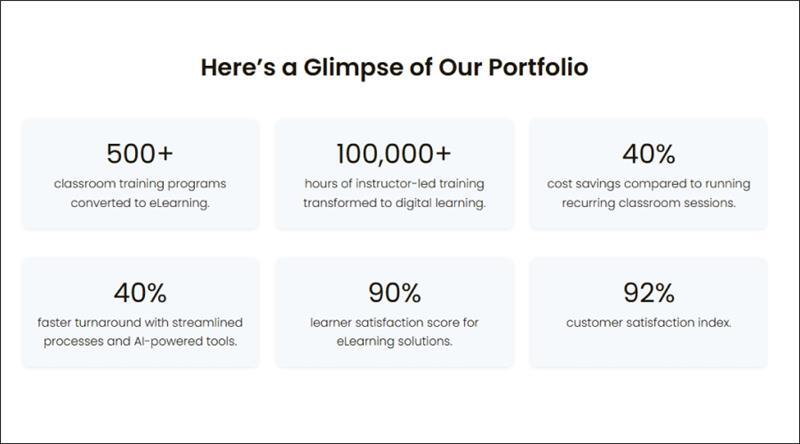
- If outsourcing, look for a vendor with a background in both ILT and VILT, to make it even easier for you. It’s us! CommLab India is your ideal partner for ILT to VILT conversion.
How to Maximize Engagement in VILT Sessions?
It is not possible to translate all the classroom activities into VILT. Hence, you need more planning and effort to engage your learners in a VILT session.
Here are a few things you can do for a successful VILT session.
- Replace activities that can’t be converted and add appropriate transitions.
- Perform periodic “pulse checks” on attendees by telling them to use “raise hand” tool
- Don’t forget to provide breaks in between!
- Decide on modalities:
- Polls
- Chat
- Breakout rooms
- Annotations
- Workbook activities
Struggling to keep learners active and focused in virtual sessions? Let’s explore proven ways to boost engagement in your VILT programs
Polls
Polls will help you to collect learners’ opinions and feedback about a specific topic. They can also be used to:
- Stimulate recall of prior knowledge
- Recap/summarize a learning point
- Quiz learners on a topic just covered
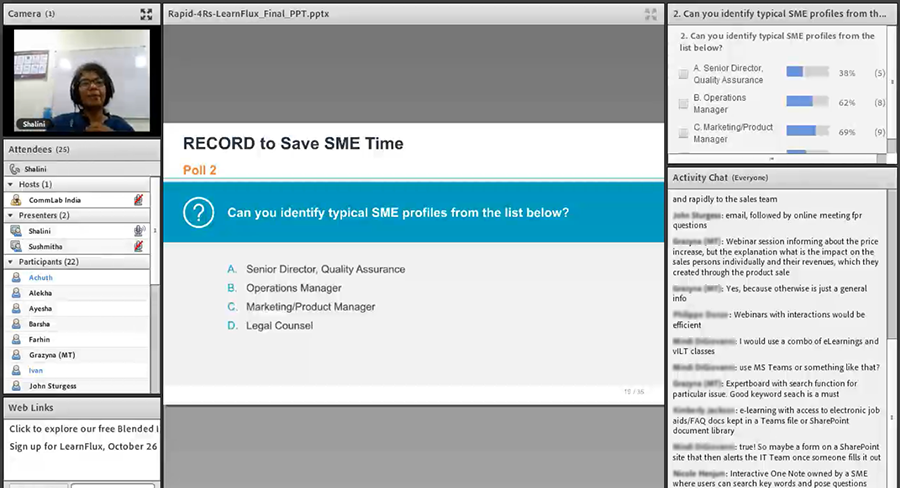
Tips to use Polls
- Decide on the kind of polls you want – Open ended/ Word cloud/ Multiple choice.
- Check if you can integrate the Poll Everywhere link into the PPT as a plug-in.
- Plan how to minimize disruption when using multiple polls.
Chat
Chats will help you connect with your learners by enabling textual communication. Chat can be:
- Used to facilitate one-on-one interactions
- Used to share global updates and instructions
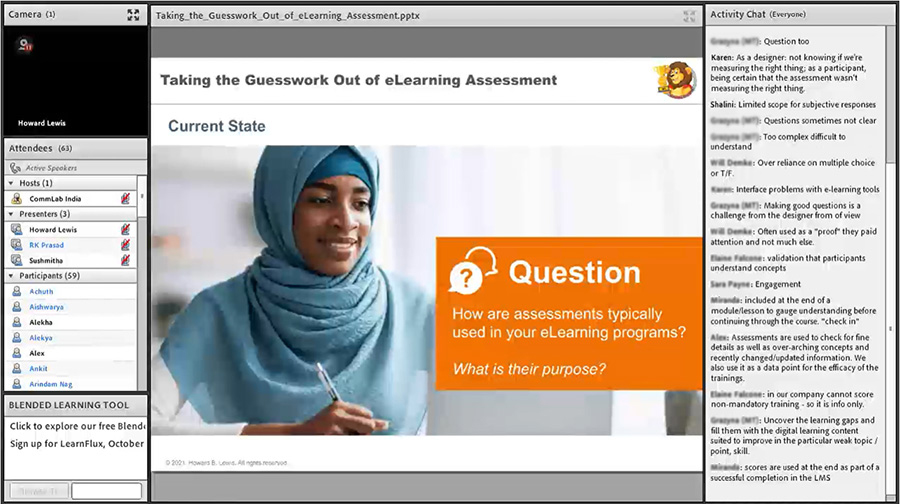
Tips to use Chat
- Clarify chat etiquette at the outset.
- Establish how participants will communicate during the session.
- Specify how volunteers can volunteer (raise hand).
- Identify activities that require unmuting participants and give instructions in the FG accordingly.
Breakout Rooms
Breakout rooms are perhaps the most effective feature of a virtual classroom. It helps replicate the collaboration and peer-to-peer interaction of a physical classroom. Breakout rooms are like virtual rooms where a small group of learners can meet to discuss, share opinions, or participate in group activities.
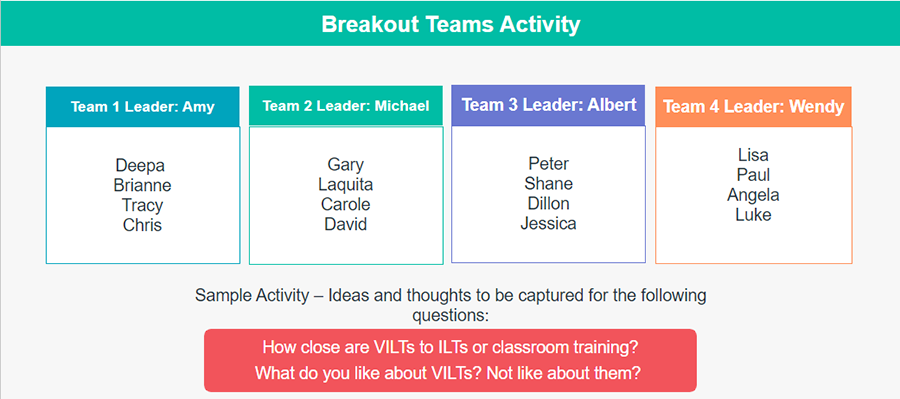
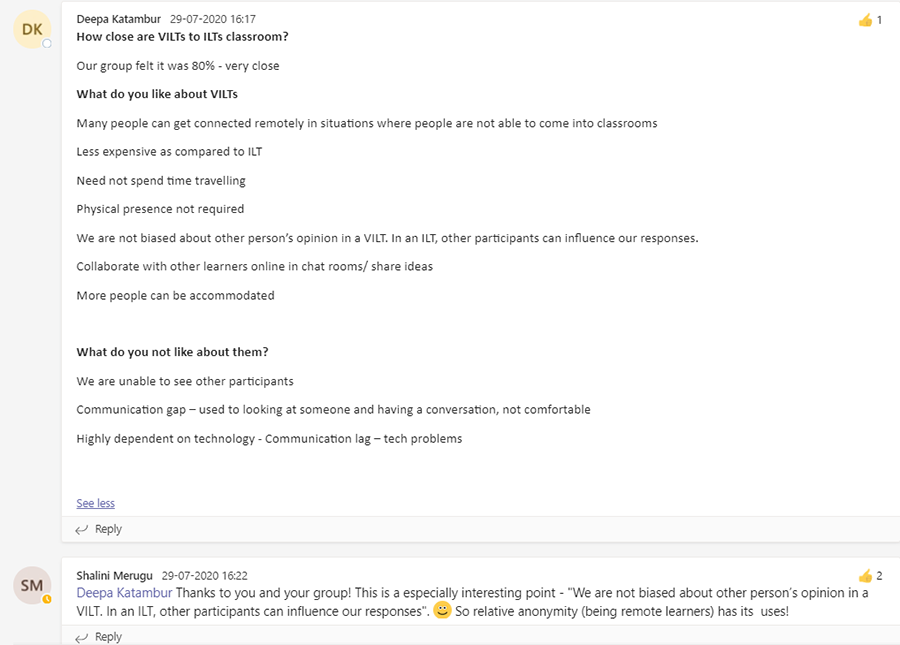
Tips to use Breakout Rooms
- Decide on the group size and composition.
- Establish ground rules for small breakout group activities.
- Make sure participants introduce themselves within Breakout groups.
- Include instructions for appointing a spokesperson to share group learnings.
- Decide on moderated discussions, which will need to be facilitated.
- Determine how you will:
- Conduct breakout room sessions
- Share breakout room instructions (participant guides or Teams)
- Summarize learnings from breakout rooms with a larger group
Whiteboard and Annotation Activities
In its simplest form, ‘annotations’ enable learners to type an answer or pick favourites from a pool of alternatives and display the results in creative ways.
Tips to use Annotation Activities
- Get familiar with the Text Annotate Tool in your Meeting center.
- Give participants a chance to try the Annotate tool for a simple activity in the first session.
- Use the whiteboard to create a grid for learners. Let them use annotation tools (pen, pencil, text box, draw) to share anything that is relevant.
- Plan how to make annotations work if the group is large.
- Make provision for capturing learning for Annotations. (Post pics of the slide on the Chat.)
Worksheet Activities
Worksheet activities in the virtual classroom have been an all-time favourite for learners to have fun while brainstorming on strategy and planning, team building, communication exercises, leadership exercises, and more.
Tips to use Worksheet Activities
- Identify Worksheet activities and ensure all participants have workbooks.
- Decide between hard copies or soft copies (in editable format).
- Provide instructions in the FG if participants need to share snapshots of the worksheet activities for discussion.
- Decide if learners need to share snapshots of the worksheet activities for discussion. If yes, share the instructions in the FG and inform learners what they need to do.
- Decide where participants will share the snapshots – maybe a separate Teams channel?
Related Read: Hook your Learners: Secrets to Better Virtual Instructor-led Training
It’s but natural to have misgivings about learner engagement in VILT. But, thanks to advances in technology, VILT now has the know-how to offer tools and features that help replicate the real classroom, virtually!
Transform Your Training for the Virtual World!
Virtual Instructor-Led Training (VILT) combines the best of live classroom interaction with the flexibility and reach of digital learning. When designed thoughtfully, it keeps learners engaged, ensures real-time collaboration, and delivers measurable business impact across distributed teams. By blending interactivity, practical exercises, and the right technology, organizations can transform traditional training into a scalable, effective, and modern learning experience that meets the needs of today’s workforce.