Many workplace learning experiences still suffer from the same underlying problem: they are designed to inform but expected to transform performance. Employees complete training, pass quizzes, and move through content efficiently, yet when it is time to use a system, handle a situation, or follow a process under real conditions, confidence often drops. They may remember what they saw but not feel ready to do it. That gap between exposure and execution is where much of training underperforms.
This is especially visible in learning contexts such as software adoption, process execution, customer interaction, compliance decision-making, and operational workflows. In each of these cases, learners do not simply need information. They need rehearsal.
That is where Adobe Captivate becomes particularly useful.
Adobe Captivate is an eLearning authoring platform used to create interactive learning experiences such as software simulations, scenario-based training, interactive video modules, and systems training content. Its value lies not just in adding interactivity, but in helping instructional designers build learning experiences that are closer to the reality of work. Adobe’s current Captivate experience emphasizes responsive authoring, simulations, interactive videos, widgets, and learner engagement tools, while Captivate Classic continues to support many established simulation and systems-training workflows.
When used strategically, Captivate helps L&D teams move beyond click-through content and create learning that allows people to observe, practice, decide, and perform.
This article explores how Adobe Captivate can be used to design richer workplace learning experiences across four high-value areas including software simulations, scenario-based learning, video-based learning, and systems and process training.
Download eBook Now: Scenario-Based Learning
Table of Contents
- Why Interactive Learning Matters More Than Content Delivery
- What Adobe Captivate Makes Possible in Modern Learning Design
- Software Simulations: From Watching Tasks to Performing Them
- Scenario-Based Learning: Designing for Judgment, Not Just Recall
- Video-Based Learning: Turning Passive Viewing into Active Learning
- Systems Training: Helping Learners Navigate Complexity with Confidence
- The Interactive Design Layer: What Makes Learning Easier to Grasp
- Designing Efficiently with Templates, Structure, and Reusable Patterns
- FAQs
Why Interactive Learning Matters More Than Content Delivery
A surprising amount of workplace learning is still designed as if knowledge alone is enough.
The assumption often goes like this: if learners can read the policy, watch the process, or review the system steps, they should be able to perform when the moment arrives. But performance does not come from awareness alone. It comes from applied familiarity.
In practice, most job-critical learning involves one or more of the following:
- carrying out tasks inside a software system
- making decisions in situations with incomplete clarity
- following workflows in the correct order
- interpreting what to do when something changes
- responding appropriately under pressure
These are not passive learning outcomes. They are performance outcomes.
That is why interactive learning matters.
Interactive learning gives learners the chance to move from simply seeing to actually doing. It allows them to test understanding, rehearse actions, receive feedback, and correct themselves before they are expected to perform in live environments. This is especially valuable when mistakes are costly, confidence is low, or systems are unfamiliar.
The real purpose of interactivity, then, is not entertainment. It is performance preparation.
And when Adobe Captivate is used well, that is precisely what it can support.
What Adobe Captivate Makes Possible in Modern Learning Design
Adobe Captivate is most valuable when viewed not as a “course creation tool,” but as a practice-rich learning environment.
Its strength lies in the range of learning experiences it can support within a single authoring ecosystem. Depending on the learning objective, Captivate can be used to build:
- Software simulations that let learners watch, try, and test tasks
- Scenario-based interactions that help learners practice judgment
- Interactive video experiences that combine demonstration with reflection and response
- Systems training modules that break down complex workflows into usable task sequences
- Custom interactions that make content more exploratory, visual, and easier to process
Adobe also highlights capabilities such as responsive-by-default design, interactive videos, simulations, widgets, branching, and customizable interactions, all of which make the tool especially relevant for performance-oriented digital learning.
What makes this useful instructionally is that real training rarely fits into one format.
A strong systems training course, for example, may need to combine:
- a short orientation video
- a workflow demonstration
- a guided software simulation
- a scenario that tests judgment
- a lightweight reinforcement interaction
Captivate supports this kind of blended learning design far more effectively than a purely slide-based workflow.
That flexibility is what allows L&D teams to align format with performance need, rather than forcing every training requirement into the same instructional shape.
Software Simulations: From Watching Tasks to Performing Them
Software simulations remain one of the most valuable uses of Adobe Captivate, especially in organizations where employees are expected to work confidently inside business systems.
This includes environments such as:
- ERP platforms
- CRM systems
- HRIS tools
- finance and procurement applications
- service and support platforms
- internal operational systems
Yet the effectiveness of simulation-based training depends heavily on whether the learning experience is built for performance transfer, not just demonstration.
Too many software training courses simply show a process and assume the learner is ready. But watching a task and performing it are not the same thing.
A more effective simulation model
Strong software simulations usually work best when they follow a progression from exposure to execution.
| Simulation Stage | Learning Purpose | What the Learner Needs |
| Demonstration | Understand the task and flow | See the process performed correctly |
| Guided Practice | Build confidence through supported action | Perform the task with prompts or cues |
| Independent Practice | Confirm readiness and reduce dependence | Complete the task without hints |
This three-part structure aligns well with how Captivate simulation workflows have traditionally been used. Adobe’s simulation-oriented materials also emphasize the value of “Demo,” “Training,” and “Assessment” modes, which map naturally to this progression.
But the real difference between a usable simulation and a forgettable one lies in the quality of instructional design around it.
What makes software simulations genuinely useful?
A well-designed simulation should help learners understand:
- why they are doing the task, not just where to click
- what common mistakes to avoid
- how the workflow connects to business outcomes
- what to do when the interface changes or a condition varies
That last point is especially important. Real software use is rarely as clean as a recorded workflow. Good systems training should therefore build confidence in the logic of the task, not just the exact sequence of clicks.
Best practices for stronger simulation design
- Keep tasks focused
Simulations are most effective when each one centers on a meaningful job task rather than a long collection of unrelated steps. - Build around real workflows
Train how work is actually done, not how the system is technically organized. - Use feedback intentionally
Learners should understand what went wrong and how to recover, not simply be told they are incorrect. - Allow repeat practice
Confidence improves when learners can revisit a simulation without penalty or pressure.
When simulations are designed this way, they become more than system walkthroughs. They become performance rehearsal environments.
Scenario-Based Learning: Designing for Judgment, Not Just Recall
Not every workplace skill is procedural.
Some of the most important learning needs in organizations involve situations where the right response depends on judgment, interpretation, or context rather than a fixed sequence of steps.
That includes training areas such as:
- customer conversations
- workplace conduct and compliance
- people management
- escalation decisions
- sales conversations
- leadership communication
These are ideal use cases for scenario-based learning.
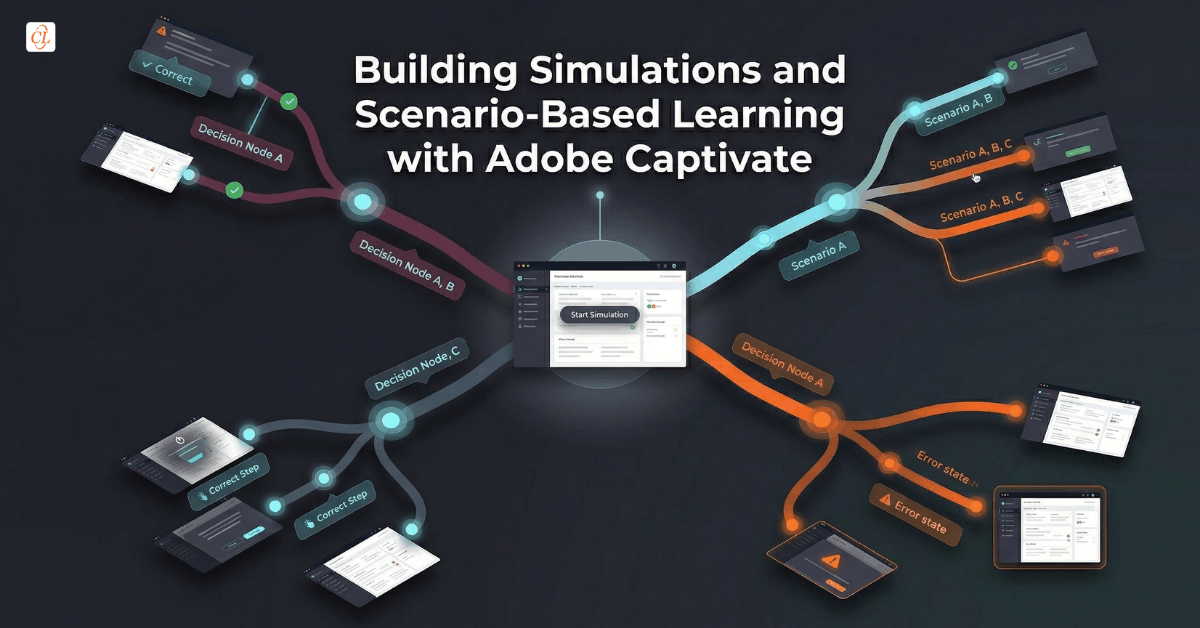
Adobe Captivate is well suited to scenario design because it allows instructional designers to combine dialogue, branching logic, feedback, states, interactions, and progression structures within one environment. Adobe’s current Captivate positioning also highlights branching, trigger-based interactivity, and immersive learning elements that support this style of design.
But the effectiveness of a scenario-based course does not come from branching alone. It comes from whether the experience feels like a credible rehearsal of workplace thinking.
What makes a scenario-based learning experience effective?
A strong scenario typically includes four things:
- A believable situation: The learner should immediately recognize the context as relevant to their role.
- Meaningful choices: The decision points should feel plausible, not artificial.
- Consequences and feedback: Learners need to see not only what was effective, but what the tradeoffs or risks were.
- Reflection: The best scenarios help learners understand the reasoning behind a strong decision.
This matters because real workplace decisions are rarely framed as “correct answer vs wrong answer.” More often, people are navigating ambiguity, pressure, competing priorities, or incomplete information.
That is exactly why scenario-based learning can be so powerful.
It gives learners the chance to think before they have to act for real.
Where Captivate scenarios work particularly well
- manager training
- ethics and compliance
- customer support training
- sales enablement
- leadership development
- service recovery conversations
When these scenarios are built around realistic tension and consequence, they do something most static eLearning cannot do well: they help learners rehearse judgment under conditions that feel real.

Scenario-Based Learning: Mastering Real-World Problem Solving
Cultivate Critical Thinking and Problem-solving Skills with Scenario-based Learning!
- Types of Scenarios
- When to Use Scenarios and When to Refrain
- Tools and Best Practices for Crafting Scenarios
- And More!
Video-Based Learning: Turning Passive Viewing into Active Learning
Video is one of the most widely used formats in digital learning, but it is also one of the most frequently underdesigned.
Many training teams use video as if visibility automatically creates understanding. A process is recorded, a walkthrough is embedded, or an expert explanation is published, and the assumption is that learning has occurred.
Sometimes it has. Often, it has not.
Video becomes much more effective when it is used not as a self-contained asset, but as part of a broader instructional experience.
This is one of the areas where Adobe Captivate has become increasingly useful. Adobe’s current Captivate environment emphasizes interactive video, including overlays, knowledge checks, bookmarks, and learner-triggered engagement points that help transform passive viewing into active participation.
When video works especially well in workplace learning
Video is particularly useful when learners need to:
- observe a task or process
- see a software workflow in action
- watch a conversation unfold
- compare effective and ineffective behaviors
- understand movement, sequence, or procedural context
In these cases, video can reduce ambiguity and help learners visualize performance more clearly than text alone.
How to make video-based learning more effective
The strongest video-based modules usually structure the learner experience in three parts:
- Before the video: Frame what learners should notice or pay attention to.
- During the video: Use pauses, prompts, overlays, or short interactions to sustain attention and focus interpretation.
- After the video: Ask learners to reflect, apply, or respond to what they observed.
That simple shift changes video from something learners watch into something they work with.
Better ways to use video in Captivate
- add reflection prompts after key moments
- embed short decision points into a scenario video
- use bookmarks to help learners revisit critical sections
- combine video with a short follow-up simulation or interaction
When video is treated as a launch point for learning rather than the learning itself, its value increases dramatically.
Systems Training: Helping Learners Navigate Complexity with Confidence
Systems training is one of the most common and most challenging use cases in workplace learning.
It is common because every organization relies on systems. It is challenging because those systems are often complex, role-specific, and introduced under pressure.
Employees are expected to learn new tools while continuing to work, and training often becomes overloaded with screens, workflows, exceptions, and process detail. If that content is poorly structured, learners disengage quickly and then depend heavily on live support after go-live.
Adobe Captivate is particularly useful in this context because it helps designers break complex workflows into structured, learnable task experiences.
What strong systems training should actually accomplish
Good systems training should help learners:
- understand what the system is for
- complete common workflows correctly
- avoid critical errors
- know what to do when something changes
- feel ready to use the system in live conditions
That means systems training should not be built as one long system tour.
Instead, it should be structured around the logic of work.
A more effective architecture for systems training
| Training Layer | Learner Need | Best Captivate Format |
| Orientation | Understand the purpose and role of the system | Short overview video or walkthrough |
| Workflow Understanding | See how a process unfolds from start to finish | Demonstration simulation |
| Guided Practice | Perform key tasks with support | Training simulation |
| Confidence Validation | Complete tasks independently | Assessment simulation |
| Reinforcement | Revisit critical actions later | Short reusable modules or interactions |
This layered structure is much more effective than treating systems training as a single long module.
It also aligns more closely with how people actually build confidence: not by memorizing everything at once, but by practicing the tasks they need most, in the sequence they are likely to encounter them.
The Interactive Design Layer: What Makes Learning Easier to Grasp
Not every learning challenge requires a full simulation, scenario, or video module.
Sometimes the biggest improvement comes from better micro-level interaction design.
Adobe Captivate includes a wide range of interactive components and widgets that can make content easier to process, navigate, and retain. Adobe highlights items such as hotspots, accordions, timelines, cards, overlays, trigger-based interactions, and other learner-facing widgets that support more exploratory learning design.
The key, however, is not to add interaction for visual novelty. It is to use interaction to make learning more usable.
Good interactions should do one of three jobs
- Clarify: Help learners understand structure, categories, sequence, or comparison.
- Reveal: Break complex information into manageable pieces so learners are not overloaded.
- Engage: Encourage learners to think, notice, or retrieve rather than simply continue clicking “Next.”
Examples of useful interaction patterns
- Tabs and accordions
Useful for chunking related concepts without crowding the screen. - Hotspots and guided reveals
Helpful when learners need to explore interfaces, diagrams, or product visuals. - Progressive disclosure
Effective for process explanations, layered concepts, or “show me one step at a time” content. - Clickable visual pathways
Useful for branching exploration, process stages, or role-specific navigation.
These patterns matter because they reduce friction.
And in digital learning, reducing friction often improves both attention and understanding.
Designing Efficiently with Templates, Structure, and Reusable Patterns
As training teams scale content production, the challenge is no longer just creativity. It is consistency, efficiency, and maintainability.
One of the most practical strengths of Adobe Captivate is that it supports repeatable structures and reusable design patterns that can help teams build faster without sacrificing instructional quality. Adobe also highlights templates, Quick Start Projects, branding blocks, and reusable interactive elements as ways to accelerate development.
That matters especially when teams are producing:
- systems training libraries
- onboarding modules
- recurring scenario-based learning
- product training series
- role-based learning paths
Why templates matter strategically
Templates are often treated as production shortcuts, but their real value is deeper than that.
When used well, they help teams:
- maintain design consistency
- reduce production inefficiency
- simplify future updates
- improve learner familiarity across a curriculum
The most effective approach is to standardize patterns, not flatten thinking.
For example, a learning team might create reusable structures for:
- simulation introductions
- process walkthrough screens
- scenario decision layouts
- video reflection moments
- system task practice screens
That gives the team a repeatable production model while still allowing the learning experience to adapt to the needs of the topic.
In other words, templates should create efficiency without sameness.
FAQs
1. What is Adobe Captivate used for in workplace learning?
A. Adobe Captivate is used to create interactive eLearning such as software simulations, scenario-based learning, interactive videos, systems training modules, and other practice-rich digital learning experiences.
2. Is Adobe Captivate good for software simulations?
A. Yes. Adobe Captivate is especially well suited for software simulations because it supports demonstration, guided practice, and assessment-style task experiences that help learners build confidence before using live systems.
3. Can Adobe Captivate be used for scenario-based learning?
A. Yes. Captivate can be used to create scenario-based learning where learners make decisions, receive feedback, and practice judgment in realistic workplace situations such as compliance, leadership, customer service, or sales.
4. How is Adobe Captivate useful for systems training?
A. Captivate is useful for systems training because it helps break complex workflows into structured learning experiences that combine demonstrations, guided practice, independent task completion, and reinforcement.
5. Is Adobe Captivate effective for video-based learning?
A. Yes, especially when video is made interactive. Captivate supports overlays, checkpoints, bookmarks, and embedded interactions that help transform passive viewing into more active learning.
6. What is the difference between simulations and scenarios in eLearning?
A. Simulations help learners practice tasks or workflows, often inside software or structured systems. Scenarios help learners practice decisions, judgment, and responses in realistic workplace situations.
7. When should instructional designers use Adobe Captivate?
A. Instructional designers should consider Adobe Captivate when training requires simulations, interactive video, systems training, scenario-based learning, or custom interactions that support practice and performance.
Conclusion
The most effective workplace learning does not stop at explanation.
It gives learners the chance to rehearse the tasks, decisions, and workflows they will actually face in their roles.
That is why Adobe Captivate continues to matter.
Not because it adds interactivity for its own sake, but because it allows instructional designers to create learning that is closer to performance.
When used thoughtfully, Captivate can support a far more useful kind of digital learning, one that helps people move from understanding to action with greater confidence, accuracy, and readiness.