Most poorly designed eLearning courses fail for a simple reason: they rely too heavily on text. Large blocks of information, static slides, and passive reading rarely create meaningful learning experiences. Learners skim through content without engaging deeply, and knowledge fades quickly after completion.
Modern digital learning environments demand something different. They require experiences that stimulate multiple senses, present ideas visually, guide learners through complex processes, and create emotional engagement. This is where multimedia becomes essential.
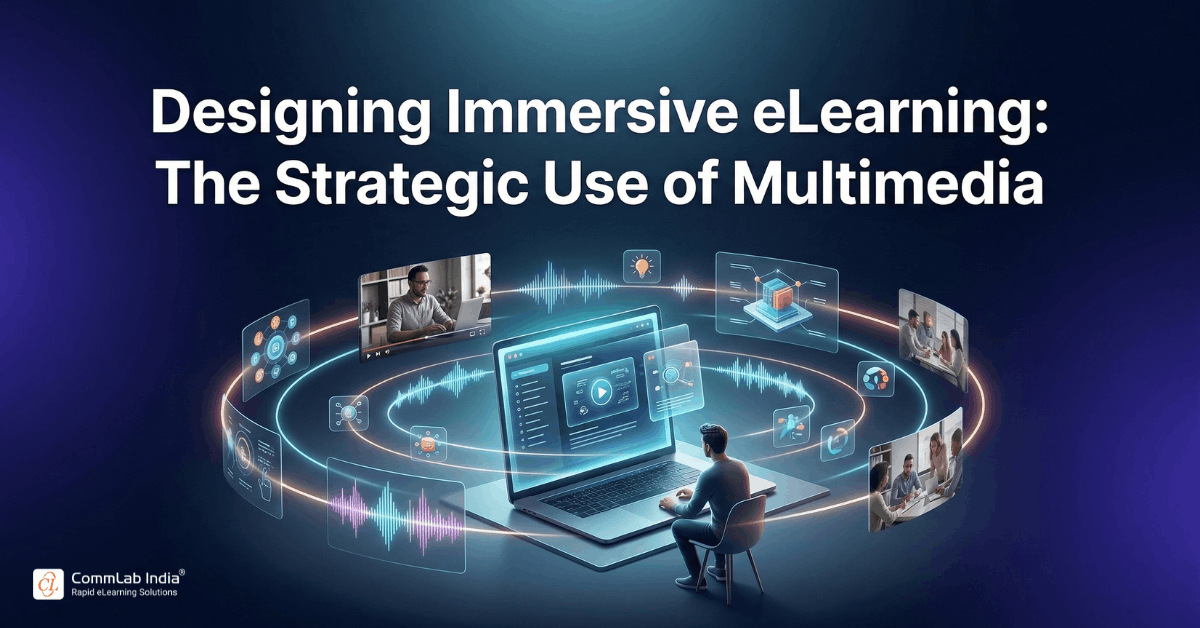
Multimedia elements such as audio narration, animation, visual storytelling, interactive characters, and digital publications transform static information into structured learning experiences. When used strategically, these components help learners process information more efficiently, understand complex concepts, and retain knowledge longer.
But effective multimedia design is not about adding more media. It is about designing the right combination of media elements that support how people actually learn.
This article explores how multimedia architecture shapes modern eLearning experiences and how organizations can design courses that communicate clearly, engage learners, and support long-term knowledge transfer.
Download Now: Instructional Design Strategies to Design Engaging eLearning Courses
Table of Contents
- What Multimedia Means in eLearning
- Why Multimedia Changes How Learners Process Information
- Designing Multimedia That Supports Learning
- The Strategic Role of Audio in eLearning
- Animation as a Tool for Explaining Complex Ideas
- Narration and Voice: Humanizing Digital Learning
- Avatars and Digital Characters in Learning Experiences
- Interactive Digital Publications and Flipbook Learning
- Avoiding Common Multimedia Design Mistakes
- Building a Cohesive Multimedia Learning Experience
- FAQs
What Multimedia Means in eLearning
Multimedia in eLearning refers to the integration of multiple forms of media such as text, images, audio, video, and animation within a single learning experience.
Instead of presenting information in one format, multimedia combines several sensory channels to help learners process and understand information more effectively.
Common multimedia elements include:
- graphics and illustrations
- audio narration and sound effects
- instructional videos
- animations and simulations
- avatars or characters
- interactive digital documents
When these elements are thoughtfully integrated, they create learning experiences that are more engaging, memorable, and accessible. However, multimedia is not simply decorative. Each element should serve a clear instructional purpose.
The goal is not to make courses visually impressive. The goal is to make ideas easier to understand and apply.
Why Multimedia Changes How Learners Process Information
Human cognition processes information through multiple channels. One channel processes visual information, while another processes auditory information. When both channels are used effectively, learners can understand information faster and retain it longer.
Multimedia supports learning in several ways.
- Improved Comprehension: Visual explanations help learners understand relationships, processes, and systems that may be difficult to grasp through text alone.
- Higher Engagement: Interactive visuals, audio, and motion capture learner attention more effectively than static content.
- Better Knowledge Retention: Information delivered through multiple sensory channels is encoded more effectively in memory.
- Accommodation of Different Learning Preferences: Some learners process information visually, while others respond better to audio explanations or demonstrations.
Multimedia environments allow learners to interact with content in different ways. However, multimedia must be designed carefully.
Irrelevant images, excessive animation, or unnecessary sound effects can actually reduce learning effectiveness. Educational psychology research refers to these as “seductive details” that distract learners from the core message.
Effective multimedia design therefore requires intentional instructional decisions.
Designing Multimedia That Supports Learning
Successful multimedia eLearning follows a few fundamental principles.
Every Element Must Serve a Learning Objective
Images, audio, and animations should directly support the concept being taught. If an element does not improve understanding, it should not be included.
Visual and Audio Elements Should Work Together
When animation and narration explain the same concept simultaneously, learners can focus on the visual process while the audio explains the meaning.
This coordination reduces cognitive effort and improves understanding.
Avoid Cognitive Overload
Too many visual elements competing for attention can overwhelm learners. Well-designed multimedia keeps screens clean, focused, and structured.
Use Motion to Explain Change
Animation is most useful when it illustrates movement, transformation, or cause-and-effect relationships. Static graphics cannot always convey these ideas effectively.
When multimedia design follows these principles, it becomes a powerful instructional tool rather than a decorative layer.
The Strategic Role of Audio in eLearning
Audio is one of the most influential but frequently misunderstood multimedia components.
It often appears in the form of:
- voice narration
- sound effects
- background music
- instructional prompts
When used effectively, audio helps guide learners through complex content and improves understanding.
Narration Explains Visual Information
Narration works best when it complements visuals rather than repeating on-screen text.
For example: A complex diagram can appear on screen while narration explains each step of the process.
This allows learners to focus on the visual information while receiving verbal guidance.
Audio Creates Instructional Presence
Voice narration adds a human element to digital learning environments.
A well-structured voiceover can create the feeling that an instructor is guiding the learner through the material.
Audio Supports Accessibility
Learners who struggle with reading-heavy content benefit from audio explanations.
Voice narration also helps learners process complex information more easily.
Audio elements such as voice-overs and sound effects can increase engagement and create a more immersive learning environment when used strategically.
However, narration must be used carefully. Simply reading the text displayed on the screen can frustrate learners and slow down the learning experience. The most effective audio provides context, explanation, and guidance.
Animation as a Tool for Explaining Complex Ideas
Animation is one of the most powerful tools available in digital learning design. Its strength lies in its ability to illustrate dynamic processes and invisible systems.
Animation is especially useful when teaching:
- complex workflows
- scientific processes
- software interactions
- cause-and-effect relationships
Instead of reading several paragraphs of explanation, learners can observe the process unfold visually.
Animation can also simplify complex ideas by breaking them into smaller visual steps.
Well-designed animations help learners:
- visualize abstract concepts
- understand processes faster
- maintain attention longer
Research shows animation can significantly enhance engagement and comprehension when used appropriately in digital learning environments. However, animation should never be used purely for visual flair.
Motion should always serve a learning purpose.
Instructional Design Strategies to Design Engaging eLearning Courses
Design Learner-Centric eLearning
- Importance of ID Strategies in eLearning
- Parameters to Select the Right ID Strategy
- ID Strategies for Effective Results
- Case Studies
Narration and Voice: Humanizing Digital Learning
Narration plays a unique role in shaping how learners experience an eLearning course.
A well-crafted voiceover can:
- guide learners through complex explanations
- emphasize key ideas
- create emotional connection
- maintain attention across longer modules
Narration is particularly effective for:
- introducing new concepts
- summarizing key ideas
- explaining diagrams or visual processes
- guiding scenario-based learning
Instructional narration is most effective when it sounds conversational rather than scripted. A natural voice tone improves engagement and helps learners feel connected to the learning experience.
High-quality narration combined with structured scripts can significantly improve knowledge retention and comprehension.
Avatars and Digital Characters in Learning Experiences
Modern eLearning increasingly incorporates avatars or digital characters to simulate real-world interaction. These characters often function as pedagogical agents.
A pedagogical agent is a computer-generated character designed to interact with learners and guide them through content.
Avatars can play different roles:
- instructor or mentor
- scenario character
- learning companion
- simulation participant
They are particularly effective in scenario-based learning where learners observe workplace interactions.
For example: A compliance course may include characters representing employees, managers, and customers. Learners watch interactions unfold and make decisions based on the scenario.
This approach transforms passive learning into an interactive experience.
Interactive Digital Publications and Flipbook Learning
Some learning experiences involve reading longer content such as manuals, reports, product documentation and policy guides. Instead of presenting these materials as static PDFs, organizations increasingly use interactive digital publications.
Flipbook-style learning materials simulate the experience of reading a physical book while incorporating multimedia elements such as:
- embedded videos
- clickable graphics
- interactive diagrams
- audio explanations
These digital publications make reading-based learning experiences more interactive and engaging. They also allow learners to navigate content easily while maintaining visual continuity.
Avoiding Common Multimedia Design Mistakes
While multimedia enhances learning, poorly implemented media can create confusion and cognitive overload.
Common mistakes include:
- Repeating On-Screen Text with Narration: Reading the exact text displayed on screen wastes learner attention and slows comprehension.
- Excessive Animation: Unnecessary motion distracts learners from the instructional message.
- Irrelevant Visual Elements: Decorative images that do not support learning objectives can reduce retention.
- Poor Synchronization: When visuals, narration, and text are not coordinated, learners struggle to follow the explanation.
- Overloaded Screens: Too many media elements competing for attention reduce clarity.
The most effective multimedia environments maintain clarity, focus, and alignment with learning goals.
Building a Cohesive Multimedia Learning Experience
Effective multimedia design requires more than selecting individual elements. It requires a coherent design system.
Successful eLearning courses typically follow a structured multimedia workflow.
Step 1: Define the Learning Objective
Every multimedia element should support a clear instructional goal. Start by identifying what learners must understand or perform after completing the lesson. This clarity ensures that visuals, audio, and interactions reinforce the intended learning outcome instead of adding unnecessary complexity.
Step 2: Choose the Appropriate Media Format
Different concepts require different media formats. Select formats that make information easier to grasp rather than simply making the screen look attractive.
For example:
- diagrams for structural relationships
- animations for processes
- narration for explanations
- scenarios for decision-making
Step 3: Design Visual and Audio Integration
Media elements must work together rather than compete for attention. Align narration with visuals so learners can listen and observe simultaneously without confusion. This coordination reduces cognitive effort and allows learners to focus on understanding the concept being presented.
Step 4: Maintain Visual Consistency
Consistent design styles help learners navigate the course more easily. Uniform layouts, icons, colors, and typography create a predictable learning environment. This consistency minimizes distractions and allows learners to concentrate on the content instead of adjusting to changing screen designs.
Step 5: Test Learner Experience
Multimedia courses should be tested for clarity, pacing, and usability. Review whether animations, narration, and visuals support comprehension rather than overwhelm learners. Testing with real users helps identify areas where explanations can be simplified or multimedia elements refined.
When multimedia elements are designed as part of a cohesive strategy, they transform digital courses into immersive learning experiences.
Frequently Asked Questions
1. What is multimedia in eLearning?
A. Multimedia in eLearning refers to the integration of multiple media types such as text, images, audio, video, and animation within a learning environment. This combination helps learners process information through different sensory channels, improving comprehension, engagement, and knowledge retention.
2. Why is multimedia important in eLearning?
A. Multimedia improves learning by presenting information in multiple formats that support different learning preferences. Visual and auditory elements help learners understand complex concepts, maintain attention, and retain knowledge more effectively than text-only instruction.
3. How does audio improve eLearning?
A. Audio enhances eLearning by guiding learners through complex visuals, providing contextual explanations, and creating a more conversational learning experience. Voice narration also supports accessibility and helps learners process information without relying solely on reading.
4. When should animation be used in eLearning?
A. Animation is most effective when explaining processes, workflows, or changes over time. It helps learners visualize dynamic systems that cannot easily be represented through static images or text explanations.
5. What role do avatars play in digital learning?
A. Avatars act as digital characters that guide learners through content or simulate real-world interactions. These characters often function as pedagogical agents that create more engaging and interactive learning environments.
6. Can too much multimedia reduce learning effectiveness?
A. Yes. Excessive or irrelevant multimedia elements can distract learners and increase cognitive load. Effective multimedia design focuses on clarity and alignment with learning objectives rather than visual complexity.
Conclusion
Multimedia has transformed how digital learning experiences are designed.
Text-heavy courses that rely solely on reading are increasingly ineffective in environments where learners expect visual clarity, interaction, and guided explanations.
Strategically designed multimedia environments combine audio, animation, narration, visual storytelling, and interactive elements to create structured learning experiences that mirror how people naturally process information.
The real power of multimedia lies not in the number of media elements used but in how thoughtfully they are integrated.
When multimedia components work together to explain ideas, illustrate processes, and guide learners through complex concepts, eLearning evolves from static content delivery into a dynamic learning experience.
That transformation is what turns information into understanding and training into lasting capability.