Ask any instructional designer who's spent real time with AI tools and they'll tell you the same thing: generic prompts produce generic output. "Write a scenario about customer service" gets you a scenario about customer service — technically responsive, instructionally forgettable.
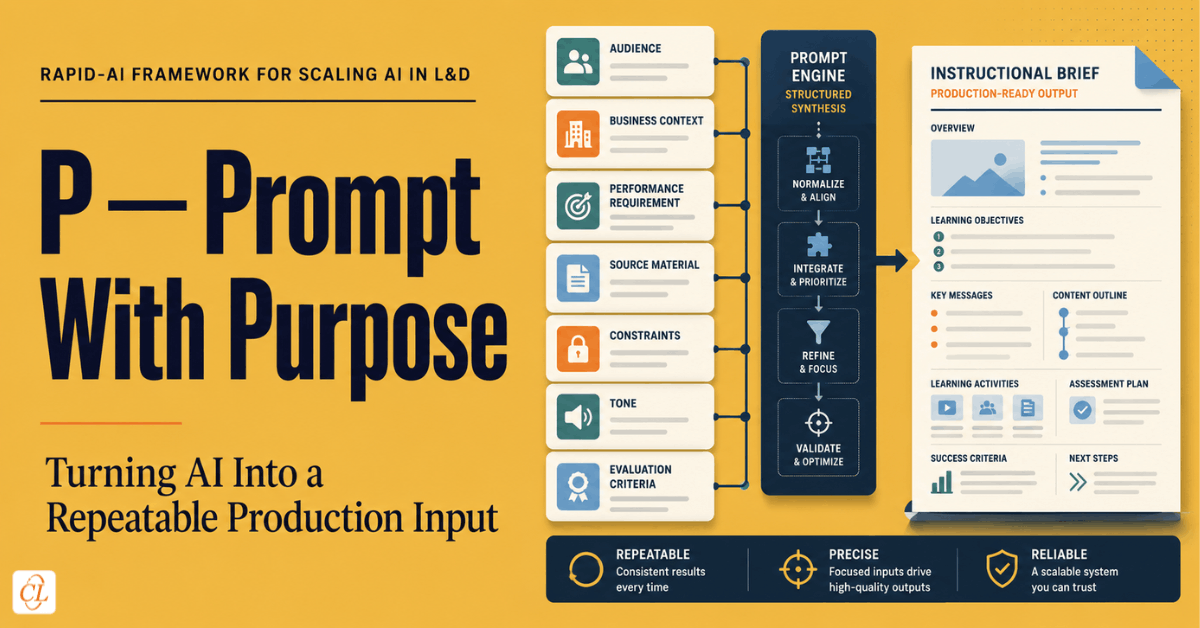
The third principle of RAPID-AI, Prompt with purpose, is about closing that gap. It's the discipline of tying every AI request to a specific, defined deliverable, rather than treating prompting as a loose conversation. Done well, this is what turns AI from a novelty a few people play with into a repeatable production input an entire team can rely on.
Table Of Content
- Why Generic Prompts Fail in Instructional Design Specifically
- What Task-Specific Prompting Actually Looks Like
- Building Reusable Prompt Templates
- Common Mistakes Teams Make
- Building a Prompt Library That Actually Gets Used
- Prompting for Different Deliverable Types
- Frequently Asked Questions
Why Generic Prompts Fail in Instructional Design Specifically
Instructional design has requirements that generic content writing doesn't: a defined learning objective the content has to serve, a specific audience with real constraints, a tone appropriate to the subject and organization, and often a format dictated by a template or authoring tool. A generic prompt doesn't carry any of that information, so the AI fills the gap with plausible defaults — a neutral tone, a generic scenario, a structure borrowed from whatever pattern is statistically common in its training data.
The result usually isn't wrong, exactly. It's just untethered from the actual deliverable. It reads like content written for an average audience about an average topic, because that's effectively what it was asked to produce.
What Task-Specific Prompting Actually Looks Like
Prompting with purpose means every request specifies the deliverable, not just the topic. In practice, that means building prompts around a small set of fixed elements every time.
The specific deliverable type. Not "content about X" but "a branching scenario with three decision points" or "a five-question knowledge check with distractors based on common misconceptions."
The audience, named specifically. Not "employees" but "first-line supervisors with 1-3 years of tenure who have not previously completed compliance training in this format."
The tone and register. Not "professional" but a description tied to the organization's actual voice — direct and low-jargon for a technical workforce, warmer and more narrative for a customer-facing team.
The constraint set. Word count, reading level, required terminology, regulatory language that must appear verbatim, or format restrictions from the authoring tool being used.
The objective the deliverable has to serve. Every scenario, assessment item, or explanation should be traceable to a specific learning objective, stated in the prompt itself, so the AI's output can be checked against it directly.
Building Reusable Prompt Templates
The real value of this principle shows up when it moves from individual habit to team infrastructure. Rather than every instructional designer reinventing prompting technique from scratch, mature teams build a small library of reusable, task-specific prompt templates — one for scenario generation, one for knowledge-check drafting, one for SME-content summarization, one for tone-matching against a style guide.
These templates do two things at once: they raise the floor on output quality for less experienced team members, and they make AI use auditable. A team can look at a template and know exactly what constraints and context were fed into a given piece of AI-assisted content, rather than trying to reverse-engineer it after the fact.
A Practical Example
Compare two prompts for the same task. Generic: "Write a knowledge check for a module on data privacy." Task-specific: "Write four multiple-choice questions testing whether a customer-facing employee can correctly identify which of five common scenarios constitutes a data-privacy violation under our internal policy. Each question needs one clearly correct answer and three plausible distractors based on real misunderstandings employees have had in past incident reports. Match the direct, low-jargon tone used in our existing compliance modules."
The second prompt produces assessment items that are directly usable, traceable to a real objective, and calibrated to actual employee behavior. The first produces something that has to be substantially reworked before it's usable at all — which erases most of the speed advantage AI was supposed to provide in the first place.
Common Mistakes Teams Make
The most common mistake is treating prompting skill as a purely individual talent rather than a team capability that should be documented and shared. When only one or two people on a team have developed strong prompting habits, AI's benefit stays trapped with them instead of scaling across the function.
A second mistake is over-specifying constraints to the point where the prompt no longer leaves room for AI to generate genuinely useful options — which conflicts with the first RAPID-AI principle, Reframe the role of AI. Purposeful prompting should narrow the output toward what's usable, not collapse it down to a single predetermined answer before AI has contributed anything.
Building a Prompt Library That Actually Gets Used
Most attempts to build a shared prompt library fail for a predictable reason: they get built once, during a burst of enthusiasm, and then go stale as tools change and nobody owns keeping them current. A prompt library that survives needs an owner, a lightweight review cadence, and a low barrier to contribution — any instructional designer who develops a prompt that consistently produces strong results for a given task type should have an easy way to add it, not a formal submission process that discourages sharing.
It also helps to organize the library by deliverable type rather than by topic. A prompt template for "branching scenario with three decision points" is reusable across dozens of different content subjects; a prompt built around one specific topic isn't. Structuring the library this way is what turns it from a collection of one-off examples into genuine reusable infrastructure.
Finally, a mature prompt library includes negative examples alongside the good ones — a note on what a vague version of the same prompt produced, and why it fell short. This does more to train new team members on the underlying principle than the good examples alone, because it makes the difference between a purposeful and a generic prompt concrete rather than abstract.
Prompting for Different Deliverable Types
Task-specific prompting looks different depending on what's actually being produced, and it's worth being concrete about a few common deliverable types rather than treating "prompt with purpose" as a single universal technique. A branching scenario prompt needs decision points and consequences specified explicitly — how many choices, whether they should have a clear right answer or represent a genuine trade-off, and what happens narratively after each one. A knowledge-check prompt needs the misconception it's testing for named directly, because a generic "write four questions about topic X" tends to produce trivia rather than questions that diagnose real performance gaps.
SME-content summarization prompts benefit from a different kind of specificity: naming exactly what the summary needs to preserve versus what it can compress. Told simply to "summarize this document," AI has no way to know that a specific compliance clause needs to be preserved verbatim while a lengthy historical justification section can be condensed to one sentence — that distinction has to come from the person prompting, because it depends on instructional judgment about what learners actually need.
Visual and script-generation prompts, meanwhile, benefit most from tone anchoring against existing material — pointing AI at a short passage of the organization's existing, approved content and asking it to match that register, rather than describing the desired tone in the abstract. Abstract tone descriptions like "professional but approachable" are interpreted inconsistently across different prompts and different sessions; a concrete reference passage removes most of that inconsistency.
Across all of these deliverable types, one habit consistently separates purposeful prompting from generic prompting: naming what would make the output unusable, not just what would make it good. Telling AI a knowledge check must never include a distractor that's factually true but off-topic, or that a scenario must never resolve with a supervisor being shown as clearly in the wrong, catches an entire category of failure modes before they happen, rather than relying on a reviewer to catch them after the fact.
It's worth revisiting prompt templates periodically against real output, not just building them once and assuming they stay effective indefinitely. As underlying AI models update, a template that reliably produced strong results six months ago can start producing subtly different output without anyone noticing until a reviewer flags something off. A quarterly spot-check — running two or three existing templates and comparing the output against a past example — catches this kind of silent drift before it affects a real deliverable.
Frequently Asked Questions
1. Why do generic AI prompts produce weak instructional design content?
A. Because instructional design requires specific context — a learning objective, a defined audience, a particular tone, and format constraints — that a generic prompt doesn't supply. Without that context, AI defaults to plausible but untethered output.
2. What should a task-specific instructional design prompt include?
A. The specific deliverable type, a named audience with real constraints, the required tone and register, any format or word-count constraints, and the learning objective the content has to serve.
3. Should every instructional designer write their own prompts from scratch?
A. No. Mature teams build a shared library of reusable, task-specific prompt templates for common deliverables like scenarios, knowledge checks, and SME-content summaries, which raises output quality across the whole team and makes AI use auditable.
4. How should a team organize a shared prompt library?
A. By deliverable type rather than by topic — a template for a branching scenario or a knowledge check is reusable across many subjects, while a topic-specific prompt isn't. Organizing this way turns the library into reusable infrastructure instead of a pile of one-off examples.
5. Why do most shared prompt libraries fail after an initial burst of enthusiasm?
A. Because they lack an owner and a review cadence. Without someone responsible for keeping templates current as tools and needs change, the library goes stale and teams quietly stop using it.
6. Is there one habit that most improves prompt quality across different deliverable types?
A. Naming what would make the output unusable, not just what would make it good — for example, specifying that a distractor must never be off-topic even if factually true. This catches entire failure categories before they happen, rather than relying on a reviewer to catch them afterward.