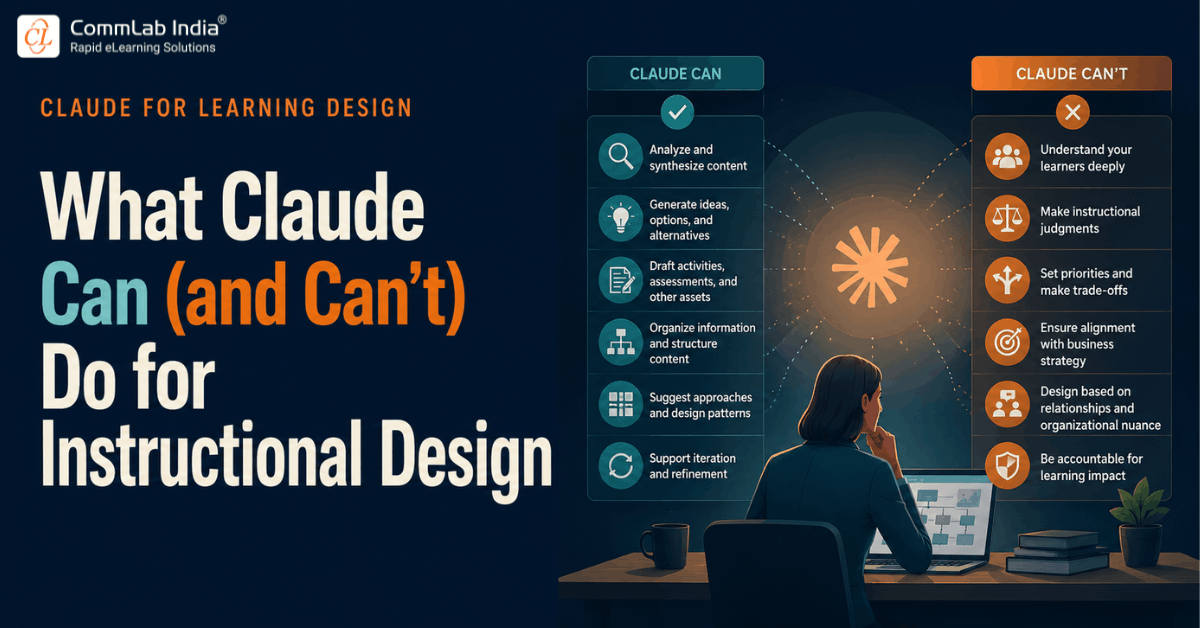
Everything covered so far in this series points toward one conclusion: Claude is genuinely capable across a wide range of instructional design activities. It can analyze dense source material, organize large volumes of information, structure a learning flow, generate alternatives, and accelerate production dramatically. Looking at that list, it's a reasonable question to ask: can Claude now design effective learning on its own?
Our experience running real projects through this workflow gives a clear answer: not quite. AI can support many parts of the process, but there remains a specific set of decisions that require instructional design expertise, and those decisions matter more to learning quality than any single capability on the "Claude can do this" list. This piece draws a clear line between the two, activity by activity, so the distinction is concrete rather than a vague reassurance that "humans still matter."
Table Of content
- Why This Distinction Needs to Be Explicit
- The Boundary, Activity by Activity
- The Pattern Underneath All Six Distinctions
- Seeing the Framework Applied to a Single Project
- What This Means in Practice
- Turning the Framework Into Team Habits
- Frequently Asked Questions
Why This Distinction Needs to Be Explicit
Vague statements like "AI supports but doesn't replace instructional designers" are easy to agree with and easy to ignore in practice. Without a specific map of where the boundary actually sits, teams tend to default in one of two unhelpful directions: treating every AI output as needing full manual rework, which wastes the genuine productivity gain, or treating AI output as decision-ready, which quietly erodes learning quality over time.
The more useful approach is to name the boundary explicitly, activity by activity, so instructional designers know exactly where to lean on Claude and exactly where their judgment is non-negotiable.
The Boundary, Activity by Activity
Claude Can Support: Analyze Information → Instructional Designers Decide: Learning Strategy
Claude can process stakeholder discussions, meeting notes, and source documents efficiently, surfacing patterns and gaps that would take a human much longer to identify manually. What it can't do is decide whether training is the right response to a business problem in the first place, or what the learning and performance strategy should actually be. That decision depends on organizational context, stakeholder priorities, and a judgment call about root cause that no amount of document analysis can supply on its own.
Claude Can Support: Suggest Activities → Instructional Designers Decide: What Learners Actually Need to Practice
Claude can generate scenario ideas, activity concepts, and interaction formats quickly and in volume. But knowing which of those activities actually addresses the learner's real performance gap, as opposed to simply being a plausible-sounding exercise, requires understanding the audience's prior knowledge, working conditions, and the specific behavior the training needs to change. That's an instructional judgment, not a content-generation task.
Claude Can Support: Generate Assessments → Instructional Designers Decide: What Success Should Look Like
Claude can draft assessment items, knowledge checks, and evaluation rubrics rapidly. Deciding what success genuinely looks like for a given learning initiative, what behavior change or performance outcome the assessment needs to actually measure, is a strategic decision that has to be made before any assessment item gets written, not inferred from the source content after the fact.
Claude Can Support: Organize Content → Instructional Designers Decide: How Learning Aligns With Business Goals
Claude organizes information beautifully: structuring content into logical groupings, sequences, and hierarchies. What it doesn't understand is the business priorities, stakeholder expectations, and organizational context sitting behind a given learning initiative. A perfectly organized module can still be strategically misaligned if it doesn't connect back to what the business actually needs from the training.
Claude Can Support: Produce Learning Assets → Instructional Designers Decide: How to Influence Behavior and Performance
Claude can produce polished learning assets efficiently: scripts, storyboards, job aids, facilitator guides. The decision about how to actually influence behavior and performance on the job, which instructional treatments will genuinely change what someone does at work rather than just what they can recall on a quiz, remains an instructional design call rooted in an understanding of adult learning and workplace performance.
Claude Can Support: Generate Alternatives → Instructional Designers Decide: Which Solution Best Fits Stakeholders and Learners
Perhaps the most important line in this entire framework: Claude can generate multiple strong possibilities quickly, strategies, formats, treatments, structures. Instructional designers decide which possibility will create the greatest impact for the specific stakeholders and learners involved. AI provides possibilities. Instructional designers make the decisions.
The Pattern Underneath All Six Distinctions
Notice what each row in this framework has in common. Claude's strengths cluster around processing: analyzing, organizing, generating, producing. Instructional designers' responsibilities cluster around judgment: strategy, relevance, success criteria, alignment, influence, and selection. That's not a coincidence, and it's not likely to change simply because AI models continue to improve at the processing side.
Processing capability and judgment capability are fundamentally different kinds of capability. One can be trained on volume and pattern recognition. The other depends on understanding a specific organization's context, a specific audience's needs, and a specific stakeholder's priorities, none of which exist in any training data because they're unique to your situation.
Quick Reference: The Full Framework
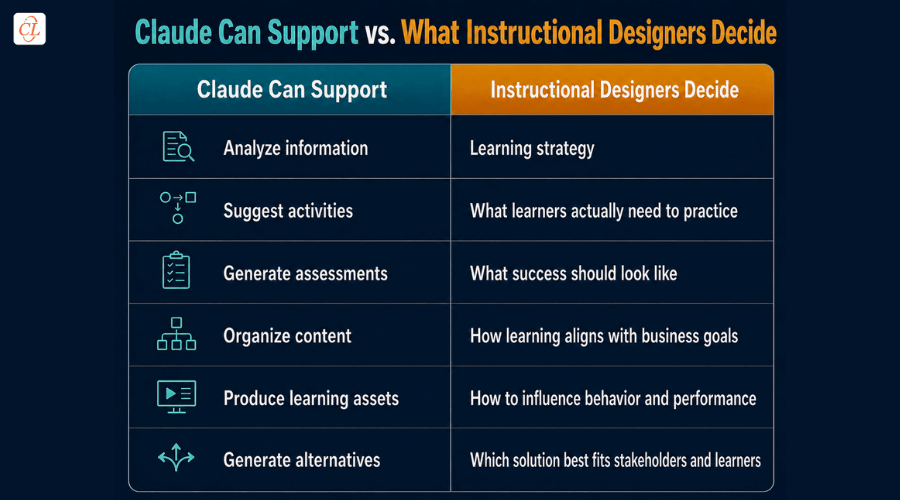
The essence of the framework fits in a single line: AI provides possibilities. Instructional designers make the decisions.
Seeing the Framework Applied to a Single Project
Abstract frameworks are easier to internalize with a concrete run-through. Take a project where a manufacturing client asks for training on a new equipment safety procedure. Claude can analyze the existing safety documentation, incident reports, and SME interview notes quickly, surfacing the key hazards and procedural steps involved. But the decision about whether this is genuinely a training problem, as opposed to a signage problem, a supervision problem, or an equipment design problem, still belongs to the instructional designer working with stakeholders, because that decision depends on understanding the actual root cause of past incidents, not just the documented procedure.
Once the team decides training is warranted, Claude can suggest practice activities: a simulation, a checklist walkthrough, a scenario-based decision exercise. But deciding which of those activities reflects what workers actually need to practice, whether the real risk is forgetting the procedure or misjudging a specific edge case under time pressure, requires understanding the work environment in a way no document analysis can fully supply. Claude can then generate assessment questions testing recall of the procedure, but the instructional designer has to determine whether recall is actually what "success" should look like here, or whether success means demonstrated correct behavior during a simulated scenario, which is a meaningfully higher and different bar.
This is where the six-row framework stops being a slide from a webinar and becomes a working checklist: at each decision point in this single project, there's a clear question about whether Claude is being asked to process information or to make a judgment call, and the answer to that question determines who should actually be driving that step.
What This Means in Practice
This framework isn't an argument against using Claude extensively in a learning design workflow. It's the opposite: understanding exactly where the boundary sits is what allows a team to lean on Claude aggressively in the areas where it genuinely accelerates work, without quietly outsourcing decisions that were never AI's to make in the first place.
In practical terms, that means building review checkpoints around the right side of this table, not the left. Speeding up analysis, content organization, and asset production is close to a pure win. Speeding past learning strategy, success criteria, and stakeholder fit without deliberate human review is where AI-augmented workflows start producing content that's fast, polished, and quietly ineffective.
The natural next question is how to operationalize this distinction into an actual repeatable process, rather than leaving it as a principle everyone nods along to and nobody applies consistently. That's exactly what the RAPID-AI framework, covered next in this series, is designed to do.
Turning the Framework Into Team Habits
Knowing the six-row distinction intellectually is different from a team applying it consistently under deadline pressure, which is when it matters most.
A few practical habits help close that gap.
First, build the right-hand column of the framework into your existing review checklist explicitly, so a reviewer isn't just checking "is this content accurate" but specifically "has someone made a deliberate decision here about strategy, relevance, success criteria, or fit, rather than accepting the AI's first framing by default."
Second, make it normal practice for an instructional designer to articulate the judgment call out loud, or in a project note, before moving forward: "I'm deciding the success criteria here is behavior change during the simulated scenario, not just recall of the steps." That small habit of naming the decision, rather than letting it happen implicitly, is often enough to catch the moments where a team has drifted into accepting AI output as decision-ready without quite realizing it.
Third, treat any project where every row on the right-hand side was decided quickly and without much friction as worth a second look. Genuine strategic decisions, learning strategy, success criteria, business alignment, stakeholder fit, are rarely obvious on the first pass. If they consistently feel easy, it's worth checking whether the team is actually deciding them or just defaulting to whatever Claude's output implied.
Frequently Asked Questions
1. What can't Claude do in instructional design, even with a well-crafted prompt?
A. Claude cannot independently decide whether training is the right solution to a business problem, what success should look like for a given initiative, how a learning solution aligns with organizational priorities, or which of several strong options best fits a specific audience and set of stakeholders. These are judgment calls dependent on context that isn't available to any AI model.
2. Is it safe to let Claude generate assessments without instructional design review?
A. Claude can draft assessment items efficiently, but the criteria for what the assessment should actually measure, what success genuinely looks like for the learning initiative, needs to be defined by an instructional designer before drafting begins and reviewed against that criteria afterward. Skipping that review risks assessments that are well-written but misaligned with the actual performance goal.
3. How should L&D teams structure quality checkpoints in an AI-augmented workflow?
A. Checkpoints are most valuable where instructional judgment, not content quality, is the risk: learning strategy decisions, success criteria definition, business alignment, and final solution selection. Content organization and asset production carry comparatively lower risk and can be reviewed more lightly once a team has established confidence in the workflow.