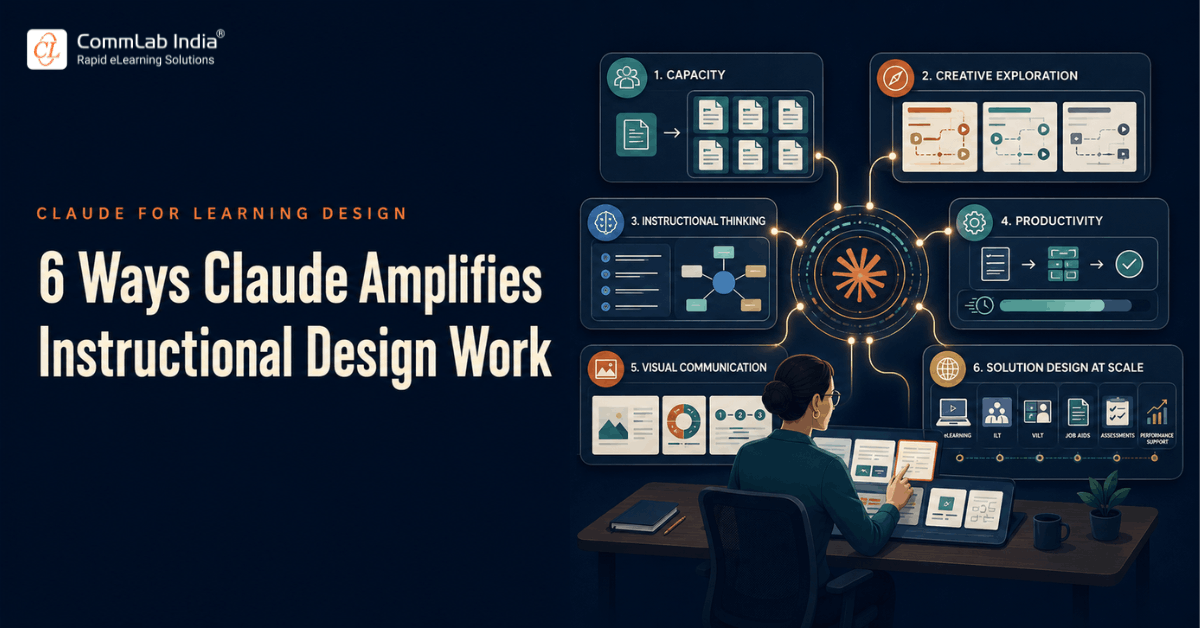
The most common way people describe AI's value to instructional design is speed: it writes faster than a human. That framing isn't wrong, but it undersells what actually changes when Claude is integrated properly into a learning design workflow. The bigger shift isn't that content gets produced faster. It's that the scope of what a single instructional designer can meaningfully take on expands.
Working with Claude across real project work surfaced six distinct capabilities that consistently amplified instructional design output, not by replacing the thinking involved, but by expanding what one person could explore, produce, and manage at once. Each is worth understanding on its own, because each shows up differently in day-to-day project work.
Table Of Content
- Capacity: Designing Complete Ecosystems From a Single Learning Need
- Creative Exploration: Comparing Possibilities Instead of Settling for the First Idea
- Instructional Thinking: Moving From Information to Clarity Faster
- Productivity: Reclaiming Time for Decisions, Not Just Production
- Visual Communication: Turning Ideas Into Something Stakeholders Can See
- Solution Design at Scale: Building Cohesion Instead of Isolated Deliverables
- Seeing the Six Capabilities Work Together
- Where Teams Get This Wrong
- What These Six Capabilities Have in Common
- Frequently Asked Questions
1. Capacity: Designing Complete Ecosystems From a Single Learning Need
Traditionally, a single learning need, "new employees need to understand our safety protocol," for example, would produce one deliverable: a course. Expanding that into a full blended solution across ILT, virtual instructor-led training, eLearning, microlearning, job aids, facilitator guides, assessments, and performance support would typically require either a larger team or a much longer timeline.
With Claude, that same starting point can expand into a complete learning ecosystem without a proportional increase in team size or time. Starting from one learning need, an instructional designer can explore what a facilitator guide, a set of job aids, a microlearning series, and a formal assessment would each look like, while maintaining consistency in terminology, tone, and instructional approach across every asset. The capacity constraint that used to force teams to pick one or two formats and abandon the rest loosens considerably.
2. Creative Exploration: Comparing Possibilities Instead of Settling for the First Idea
Under normal production pressure, instructional designers often move forward with the first workable idea simply because there isn't time to generate and compare alternatives. Claude changes that calculation. Rather than developing a single storyboard approach and committing to it, an instructional designer can generate multiple instructional strategies, interaction concepts, and scenario variations, then compare them side by side before selecting the strongest option.
This matters more than it might initially sound. A lot of mediocre learning design isn't the result of a bad idea; it's the result of an untested first idea that nobody had the bandwidth to compare against alternatives. Creative exploration at this scale used to be a luxury reserved for high-budget projects. Claude makes it a viable default step in ordinary project work.
3. Instructional Thinking: Moving From Information to Clarity Faster
Perhaps the least visible but most valuable capability is Claude's usefulness as a thinking partner during the analysis phase. Understanding dense SME content, synthesizing scattered information, identifying learning gaps, and structuring a learning journey are all cognitively demanding tasks that traditionally happen slowly, often through multiple rounds of re-reading and note-taking.
Claude accelerates the path from raw information to instructional clarity. It can help an instructional designer work through technical material, surface the concepts that actually matter for the learner, identify what's missing, and propose an initial structure for a learning journey. The instructional designer still evaluates and refines every one of those outputs, but the starting point is dramatically further along than a blank page.
4. Productivity: Reclaiming Time for Decisions, Not Just Production
Claude clearly accelerates repetitive design tasks: drafting objectives, generating assessment items, producing first-pass scripts, and handling routine rework between review cycles. That's a genuine productivity gain, but the more important shift isn't the time saved. It's what that reclaimed time gets spent on.
Time saved on production tasks is time an instructional designer can reinvest in the decisions that actually shape learning quality: whether a scenario reflects real workplace conditions, whether an assessment genuinely measures the right behavior, whether the sequencing respects how learners actually build confidence. Productivity gains that get reinvested into better decisions produce a very different outcome than productivity gains that just get banked as faster turnaround with the same instructional thinking behind it.
5. Visual Communication: Turning Ideas Into Something Stakeholders Can See
Instructional designers often need to communicate a concept, a learning journey, a process flow, a storyboard structure, long before any of it exists as finished content. Historically, that meant either a lot of descriptive text in a design document or a separate design resource to produce visuals.
With Claude Design, those ideas don't have to remain trapped as text. Diagrams, learning journey maps, process flows, storyboard concepts, and presentation-ready graphics can be generated quickly enough to become a normal part of the design conversation rather than a late-stage nice-to-have. That shift makes it considerably easier to align stakeholders early, before a full build is underway and changes become expensive.
6. Solution Design at Scale: Building Cohesion Instead of Isolated Deliverables
The final capability ties the previous five together. Rather than designing each learning asset independently and hoping they cohere into a consistent experience, Claude supports building complete blended learning solutions with consistency maintained across every component from the outset.
This is a meaningful departure from how blended learning solutions have traditionally been built, where an eLearning module, a facilitator guide, and a job aid might be produced by different people at different times, with consistency checked and corrected after the fact rather than designed in from the start. Claude makes it realistic to design the full solution with a unified instructional logic running through every deliverable.
Seeing the Six Capabilities Work Together
These six capabilities rarely show up in isolation on a real project. A typical example: an instructional designer receives a request to build a compliance refresher for a global sales team, spread across four regions and three languages, with a two-week timeline.
Capacity means the team can plan a full ecosystem from the start, a short eLearning module, a one-page job aid, and a facilitator guide for regional managers running live refreshers, rather than settling for just the eLearning module because that's all the timeline would normally allow.
Creative exploration means the team can compare a scenario-based approach against a more traditional knowledge-check approach before committing, instead of locking into the first idea because there's no time to consider alternatives.
Instructional thinking accelerates the work of digesting the compliance policy itself and identifying which parts genuinely require training versus a simple reference document. Productivity reclaims enough time that the reclaimed hours go toward reviewing regional nuances rather than toward drafting from scratch.
Visual communication makes it possible to show regional stakeholders a learning journey map early, catching a misalignment in expectations before a single slide is built.
And solution design at scale keeps the eLearning module, the job aid, and the facilitator guide consistent with each other, rather than each being built independently and reconciled at the end.
None of that changes the two-week timeline pressure. What changes is how much of that time gets spent on production versus on the decisions that determine whether the refresher actually reduces compliance incidents.
Where Teams Get This Wrong
It's worth naming the failure mode that shows up when these six capabilities are treated as a replacement for judgment rather than an amplifier of it.
Capacity without judgment produces a full ecosystem of assets that are consistent with each other but not necessarily right for the audience, more formats, not necessarily better learning. Creative exploration without judgment produces a longer list of alternatives that nobody actually takes the time to evaluate properly, so the "chosen" option ends up being whichever one Claude happened to present first or most persuasively.
Productivity gains without a plan for how the reclaimed time gets spent tend to quietly disappear into more volume rather than better decisions; teams end up producing more courses at the same quality level rather than fewer, better ones. And solution design at scale, without careful review, can produce a beautifully consistent set of learning assets that are consistently missing the mark on what the audience actually needs, since consistency is a production quality, not an instructional one.
The pattern across all four failure modes is the same: each capability genuinely expands what's possible, but expanding what's possible only helps if someone is still making deliberate choices about what should actually be done with that expanded possibility space.
What These Six Capabilities Have in Common
Look across all six and a pattern emerges: none of them replace instructional decision-making. Capacity doesn't decide which formats are actually appropriate for the audience. Creative exploration doesn't decide which idea best fits the business context. Instructional thinking support doesn't decide what the learner truly needs to practice. Every one of these capabilities expands what an instructional designer can explore, produce, and manage, while leaving the actual judgment calls exactly where they've always belonged.
That distinction, between expanding capability and replacing judgment, is the difference that separates AI-augmented learning design done well from AI-generated content that merely looks complete. It's also exactly where the boundary between "Claude can support this" and "an instructional designer must decide this" becomes concrete and specific, which is the focus of the next piece in this series.
Quick Reference: The Six Amplification Areas
|
Capability |
What It Expands |
|
Capacity |
The number of formats and assets designed from a single learning need |
|
Creative Exploration |
The number of instructional approaches compared before committing |
|
Instructional Thinking |
The speed of moving from raw source material to instructional clarity |
|
Productivity |
The time available for decisions rather than production |
|
Visual Communication |
The ease of aligning stakeholders before a full build begins |
|
Solution Design at Scale |
The consistency maintained across a full blended learning solution |
Frequently Asked Questions
Does Claude replace the need for instructional design skills in content production?
No. Each of the six capabilities expands what an instructional designer can explore, organize, or produce, but none of them make decisions about learning strategy, audience relevance, or business alignment. Those judgment calls remain the instructional designer's responsibility regardless of how much production capability the tool adds.
Which of these six capabilities has the biggest impact on project timelines?
Capacity and productivity tend to have the most visible impact on timelines, since they directly affect how many assets and formats a single instructional designer can take on. Instructional thinking support has a less visible but often larger impact on quality, since it affects how well the analysis phase is done before any content is drafted.
How does Claude Design fit into an instructional design workflow?
Claude Design is used primarily during the conceptual and stakeholder-alignment stages, turning ideas like learning journeys, process flows, and storyboard concepts into visuals before a full build begins. This makes it easier to gather stakeholder feedback early, when changes are inexpensive, rather than late in production, when they're costly.

![7 Instructional Design Standards for Effective eLearning [Infographic]](https://www.commlabindia.com/hubfs/Imported_Blog_Media/instructional-design-tips-for-custom-elearning-Jul-04-2023-05-07-13-3878-AM.jpg)