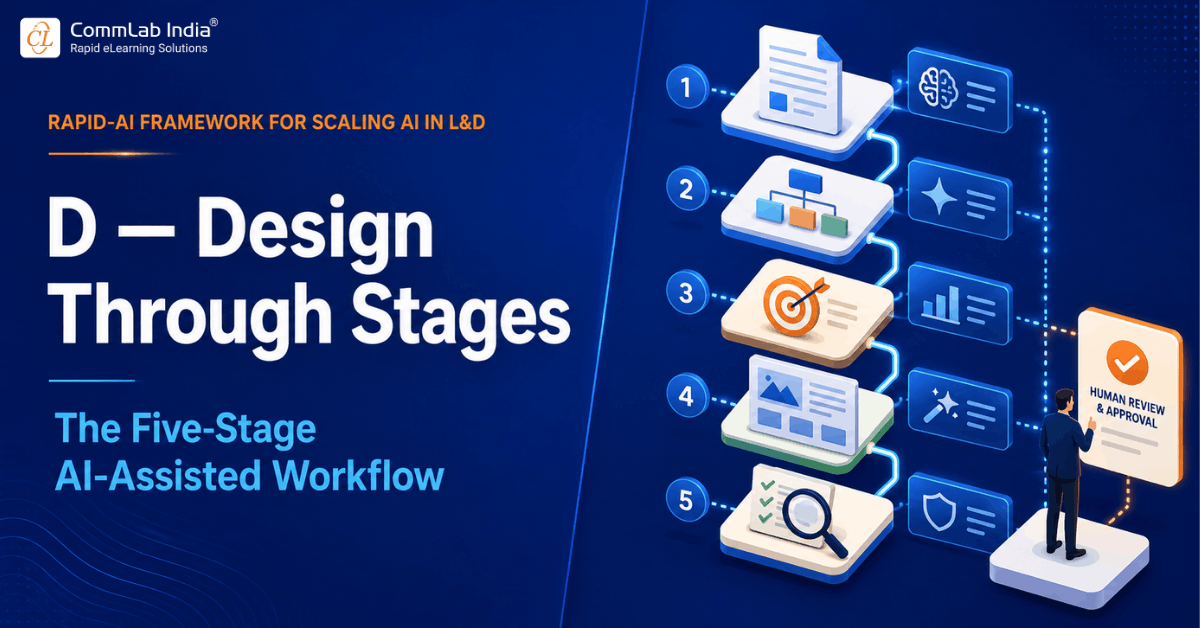
If the other six principles of RAPID-AI define the mindset and guardrails around AI use, Design through stages is where all of that becomes concrete. It's the operational core of the framework: a five-stage workflow that defines exactly where AI accelerates and where a human finalizes, at every single point in course development.
This principle exists because good intentions about human oversight tend to evaporate under deadline pressure unless they're built into the actual sequence of work. A five-stage structure with a defined AI role and a defined human role at each stage doesn't leave that division of labor up to interpretation in the moment.
Table Of Content
- The One Rule That Governs All Five Stages
- Why the Stage Structure Matters More Than Any Single Stage
- Common Mistakes Teams Make
- Adapting the Five Stages to Different Project Sizes
- Common Handoff Failures Between Stages
- Frequently Asked Questions
The One Rule That Governs All Five Stages
Before the stages themselves, there's a single governing rule that applies at every one of them: AI produces a draft, and a human closes it out. Not a human glances at it. Not a human approves it by default because it looks finished. A human actively finalizes it, applying judgment the AI structurally cannot supply. This is the rule that keeps development speed from becoming an instructional-quality risk.
Stage 1: Decode SME Content
Raw subject-matter content — policy documents, technical manuals, expert interviews, legacy training materials — rarely arrives in a form ready for instructional design. In this stage, AI decodes that raw material into a structured summary: key concepts, sequence, terminology, and apparent gaps or ambiguities.
The SME then validates that summary for accuracy. This step matters because AI can misinterpret domain-specific nuance, especially in technical or regulated content, and an inaccurate foundation propagates through every later stage. The SME's validation here is non-negotiable, not optional quality control.
Stage 2: Architect Learning Flow
With validated content in hand, AI suggests a possible learning flow — a sequence and structure for how the material could be organized into a course. The instructional designer then refines that suggested flow based on audience and context: prior knowledge, motivation, the realistic amount of time learners will actually spend, and any organizational constraints AI has no visibility into.
Stage 3: Define Objectives and Evidence
AI drafts learning objectives and corresponding assessment items based on the architected flow. The instructional designer finalizes both against real performance requirements — not just whether the objectives are well-written, but whether achieving them would actually close the performance gap identified earlier in the process.
Stage 4: Shape Learning Treatment
This is where most of the visible content gets produced: first-draft scenarios, visuals, and scripts. AI generates these drafts quickly, and the instructional designer curates and adapts them — selecting the best options, adjusting tone, and tailoring specifics to the audience in ways AI's initial draft couldn't fully anticipate. Task-specific prompting with purpose is especially useful here because the deliverable and constraints become concrete.
Stage 5: Inspect and Audit
Before anything moves forward, AI audits the near-final product for gaps and inconsistencies — this is where the Introduce challenge principle operationalizes directly into the workflow. The instructional designer gives final approval only after reviewing that audit, closing the loop on the entire five-stage process.
Why the Stage Structure Matters More Than Any Single Stage
It's tempting to focus on optimizing individual stages — better prompts for Stage 1, better tools for Stage 4. But the real value of this principle is structural: because every stage has an explicit AI role and an explicit human closing action, there's no ambiguous middle ground where a rushed team could reasonably skip the human step and call it done.
This also makes the framework auditable. A team can point to exactly which stage a piece of content is in, who is responsible for closing it out, and what 'closed out' actually means at that stage — which is difficult to do with a looser, less staged AI-assisted process.
Common Mistakes Teams Make
The most common mistake is collapsing stages under deadline pressure — skipping straight from Stage 1 to Stage 4 because a team feels confident about the objectives without formally defining them in Stage 3. This is exactly the shortcut the framework is designed to prevent, and it's usually where quality problems that surface later trace back to.
A second mistake is treating the human closing action at each stage as a formality rather than substantive work. 'Human finalizes it' should mean applying real judgment specific to that stage, not a rubber-stamp approval that exists only so the team can say a human was involved.
Adapting the Five Stages to Different Project Sizes
Not every project justifies the same weight at every stage. A short, low-stakes refresher module and a multi-region compliance rollout both pass through the same five stages conceptually, but the depth of work at each one should scale with the project's complexity and risk, not follow an identical checklist regardless of scope.
For a small, low-risk project, Stage 1 (decoding SME content) might be a quick validation conversation rather than a formal sign-off document, and Stage 5 (inspect and audit) might be a single reviewer's pass rather than a multi-person review board. For a large, high-stakes rollout, each stage typically involves more people, more documentation, and more time — but the fundamental structure, and the rule that a human closes out every stage, doesn't change.
This scalability is part of what makes the five-stage model practical rather than purely theoretical. Teams sometimes worry that a formal staged workflow will feel bureaucratic for smaller projects. In practice, the stages define what needs to happen, not how heavily it needs to be documented — a distinction that lets the same workflow serve a two-day project and a two-month one without either feeling like the wrong tool for the job.
Common Handoff Failures Between Stages
Most breakdowns in this workflow don't happen inside a single stage — they happen at the seam between two stages, when information a human considered obvious doesn't make it into what AI receives for the next stage. A frequent example: the instructional designer refines the learning flow in Stage 2 based on audience context that lived entirely in their head, and that context never gets carried forward into the objectives and assessment drafting in Stage 3, so AI's draft objectives end up technically sound but disconnected from the audience-specific reasoning that shaped the flow.
A second common handoff failure happens between Stage 4 and Stage 5: the instructional designer makes substantive edits to AI's draft scenarios and scripts during curation, but the audit in Stage 5 gets run against an earlier version of the material rather than the actually-edited one, because nobody updated what got fed into the audit step. This produces an audit that looks thorough but is checking the wrong document.
Both failures share a root cause: treating the five stages as sequential AI calls rather than as a workflow where context has to be actively carried forward at each handoff. Teams that build in an explicit habit — briefly restating relevant context and passing along the actual current version of the material at the start of each stage, rather than assuming it carries over automatically — catch most of these gaps before they become embedded in a near-final product. This is one reason a method matters in AI prompting: the work needs continuity across stages, not isolated prompts.
A simple, low-effort safeguard against both failures is a short 'stage handoff note' — two or three sentences an instructional designer writes when moving material from one stage to the next, capturing any context or edits that wouldn't otherwise be obvious from the document itself. This takes a few minutes per handoff and consistently prevents the most common source of quality gaps in the entire workflow.
It's also worth naming which stage tends to get the least attention in practice: Stage 3, defining objectives and evidence. Teams under time pressure often treat this as a quick formality between architecting the flow and shaping the actual content, when in reality it's the stage that determines whether everything built afterward is actually testable against a real performance requirement. A rushed Stage 3 tends to produce technically well-written objectives that don't map cleanly to anything measurable, which surfaces as a frustrating, hard-to-diagnose problem much later, typically during Stage 5's audit or in post-launch evaluation.
Frequently Asked Questions
1. What are the five stages of the RAPID-AI instructional design workflow?
A. Decode SME content, Architect learning flow, Define objectives and evidence, Shape learning treatment, and Inspect and audit. At each stage, AI produces a draft and a human finalizes it.
2. Can stages in the AI-assisted workflow be skipped to save time?
A. Skipping or collapsing stages under deadline pressure is the most common failure mode of this workflow, and it's usually where downstream quality problems originate — particularly skipping the objectives stage or the final audit stage.
3. What is the one rule that applies to every stage of the workflow?
A. AI produces a draft, and a human finalizes it — applying real judgment, not a rubber-stamp approval, at every one of the five stages.
4. Does the five-stage workflow apply the same way to small and large projects?
A. The structure stays the same, but the depth scales with project risk and complexity — a small project might need a quick validation conversation at each stage, while a large rollout needs more formal documentation and more reviewers, without changing which decisions require human sign-off.
5. What's a simple way to prevent context from getting lost between stages?
A. A short handoff note — two or three sentences capturing context or edits that wouldn't otherwise be obvious — written each time material moves from one stage to the next. It takes minutes and prevents the most common source of quality gaps in the workflow.


![5 Instructional Design Strategies to Create Enchantment in eLearning Courses [Infographic]](https://www.commlabindia.com/hubfs/blogs/instructional-design-strategies-top-infographic.jpg)